STATE OF
DEPARTMENT OF HEALTH
eMedNY
MEVS
Provider Manual
March 12, 2008
Version 1.20
THIS PAGE INTENTIONALLY LEFT BLANK
Table of Contents
Section
1.0 INTRODUCTION TO THE NEW YORK STATE
MEDICAID ELIGIBILITY VERIFICATION SYSTEM
2.0 BENEFIT IDENTIFICATION CARDS/FORMS
2.1 Permanent Common Benefit Identification Photo Card
2.2 Permanent Common Benefit Identification Non-Photo Card
2.3 Replacement Common Benefit Identification Card
3.0 INTRODUCTION TO TELEPHONE (Audio
Response Unit) VERIFICATION
3.1 Telephone Equipment Specifications
3.2 Telephone Verification Using the Access Number or Medicaid Number (CIN)
3.3 Telephone Verification Input Section
3.4 Telephone Verification Response Section
3.5 Telephone Verification Error and Denial Responses
4.0 INTRODUCTION TO THE Verifone Omni 3750
MEVS Terminal
6.0 VeriFone Omni 3750 Terminal
6.1 VeriFone Omni 3750 Terminal - Front
6.1.1 VeriFone
Omni 3750 Terminal Description - Front
6.2 VeriFone Omni 3750 Terminal – Back
7.0 VeriFone Installation Instructions
7.1 Instructions to Reset Day/Date/Time
7.2 Instructions for Setup Menu (P1 Key)
7.3 Instructions for Provider Menu (P2 key)
8.0 VeriFone Verification Input Section
8.1 VeriFone Verification Using the Access Number or Medicaid Number (CIN)
8.2 Instructions for Completing a VeriFone Transaction
8.2.1 Instructions
for Completing Tran Type 1
8.2.2 Instructions
for Completing Tran Type 2
8.2.3 Instructions
for Completing Tran Type 3
8.2.4 Instructions
for Completing Tran Type 4
8.2.5 Instructions
for Completing Tran Type 6
8.2.6 Instructions
for Completing Tran Type 7
9.0 VeriFone Verification Response Section
13.2 Taxonomy and Service Type Codes
13.7 New York City Office Codes
Special Services
for Children (SSC)
Office of Direct
Child Care Services
14.0 DISPOSAL OF TRANZ 330 DEVICE
14.1 Instructions to clear memory
THIS PAGE INTENTIONALLY LEFT BLANK
The verification process through MEVS can be accessed using one of the following methods:
- the MEVS Terminal (VeriFone).
- a telephone verification process (Audio Response Unit).
- alternate access methods: (CPU-CPU link, batch transmission, PC-Host link and ePACES).
Information available through MEVS will provide you with:
- The eligibility status for a Medicaid client for a specific date (today or prior to today).
- The county having financial responsibility for the client (used to determine the contact office for prior approval and prior authorization.)
- Any Medicare, third party insurance or HMO coverage that a client may have for the date of service.
- Any limitations on coverage which may exist for the client through Utilization Threshold (UT) or Post and Clear (PC) programs and the necessary service authorizations, if applicable.
- Any restrictions to primary providers or exception codes, which further clarify a client's eligibility.
- Co-payment information.
- Dispensing Validation Numbers (DVS) for certain Drugs, Durable Medical Equipment, and Dental Services. (Not available via telephone access.)
- The ability to verify or cancel a previously obtained Service Authorization (SA) (not available via ARU).
The above information is not available on the Common Benefit Identification Card issued to the client.
MEVS is convenient and easy to use; it is available 24 hours a day, seven days a week.
MEVS is accurate; it provides current eligibility status information for all Medicaid clients and is updated on a daily basis.
MEVS is responsive; verification information is given in clear, concise and understandable messages.
MEVS should result in a reduction of claims pending or denied due to Medicaid eligibility problems.
This manual is designed to familiarize you with MEVS. The manual contains different sections discussing the Common Benefit Identification Card, the verification equipment, procedures for verification, a description of eligibility responses, definitions of codes, and descriptions of alternate access methods.
ALTERNATE
ACCESS TO MEVS (Rev. 02/05)
Additional alternative methods of access allow providers to use their own equipment to access MEVS. The following is a brief description of these alternate access methods.
·
ePACES
Refer to ePACES on http://www.emedny.org/HIPAA/SupportDocs/ePACES.html
· CPU-CPU LINK
This method is for providers who want to link their computer system to the MEVS contractor's computer system via a dedicated communication line. Upon receiving a MEVS verification request, the MEVS contractor sends back a response within seconds.
CPU-CPU link is suggested for service bureaus and high volume (5,000 to 10,000 transactions per day) providers.
·
eMedNY
eXchange
This method allows users to transfer files from their computer via a web-based interface. Users are assigned an “inbox” and are able to send and receive transaction files in an email-like fashion. Transaction files are “attached” and sent to eMedNY for processing. Responses are delivered to the user’s inbox, and can be downloaded to the user’s computer.
·
Batch Transmission
This method is the standard process for batch authorization transmissions. FTP allows users to transfer files from their computer to another computer (upload) or from another computer to their computer (download). Each batch file transmission sent to the eMedNY contractor is required to be completed within two hours. Any transmission exceeding two hours will be disconnected.
· PC-HOST LINK
This method requires a PC, a dial up modem, and a specific message format. Verification requests are transmitted to the MEVS contractor one transaction at a time. Verification responses are returned within seconds.
The PC-Host method is suggested for low volume (under 500 transactions per month) and medium volume (500-2,000 transactions per month) providers. It is also recommended for providers who want to capture Medicaid information electronically to combine with billing and claims processing.
For further information about alternate access methods and the approval process, please call 1-800-343-9000.
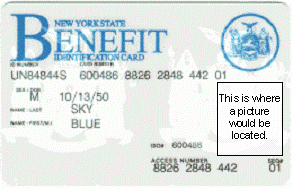
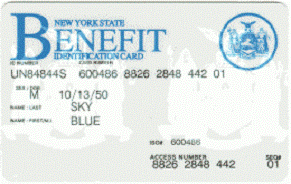
The Benefit Identification Cards with which you will need to become familiar are:
- a CBIC permanent plastic photo card.
- a CBIC permanent plastic non-photo card.
- a replacement paper card.
Presentation of a Benefit Identification Card alone is not sufficient proof that a client is eligible for services. Each of the Benefit Identification Cards must be used in conjunction with the electronic verification process. If you do not verify the eligibility of each client each time services are requested, you will risk the possibility of nonpayment for services which you provide.
In addition, there is a Temporary Medicaid Authorization Form which constitutes full coverage for medical services and does not need to be verified via the electronic process. The following is a detailed description of the Temporary Medicaid Authorization Form and each of the cards.
Temporary
Medicaid Authorization Form
In some circumstances, the client may present you with a Temporary Medicaid Authorization (TMA) Form DSS-2831A (not pictured). This authorization is issued by the Local Department of Social Services when the client has an immediate medical need and a permanent plastic card has not been received by the client. The Temporary Medicaid Authorization Form is a guarantee of eligibility and is valid for 15 days. If presented with the authorization form after the time frame specified, the client should be requested to present his/her permanent Common Benefit Identification Card.
Providers should always make a copy of the TMA form for
their records. Since an eligibility record is not sent to the eMedNY contractor
until the CBIC Card is generated, the MEVS system will not have eligibility
data for a client in TMA status. Note that any claim submitted for payment may
pend waiting for the eligibility to be updated. If the final adjudication of
the claim results in a denial for client eligibility, please contact the New
York State Department of Health, Office of Health Insurance Programs, Local
District Support. The phone number for inquiries on TMA issues for clients
residing Upstate is (518)-474-8887. For
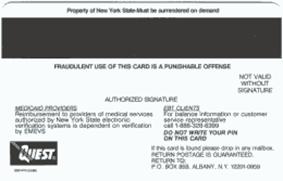
The Permanent Common Benefit Identification Photo Card is a permanent plastic card issued to clients as determined by the Local Department of Social Services. This permanent card has no expiration date. Eligibility must be verified using the MEVS system.
|
|
|
|
COMMON BENEFIT IDENTIFICATION
PHOTO CARD DESCRIPTION |
|
|
ID Number |
Eight-digit number assigned by
the State of |
|
Sex |
One letter character indicating
the sex of the client. This character is located on the same line as date of
birth. M = Male F = Female U = Unborn (Infant) |
|
Date of Birth |
Client’s date of birth,
presented in MM/DD/YY format. Example: August 15, 1980 is shown as
08/15/1980. Unborns (Infants) are identified by 00000000. The date is located
on the same line as sex. |
|
Last Name |
Last name of the client who will
use this card for services. |
|
First, M.I. |
First name and middle initial of
the person named above. |
|
Signature |
Electronic Signature of
cardholder, parent, or guardian. |
|
ISO# |
Six-digit number assigned to the
New York State Department of Health (DOH). Disregard when manually entering
access number for Medicaid verification. |
|
Access Number |
Thirteen-digit number (including
the 2 digit sequence number) used for entry into the Medicaid Eligibility
Verification System. The access number is not used for billing. |
|
Sequence Number |
Two-digits at the end of the
access number. This number is used in the entry process of access number and
client number (CIN) verifications. |
|
Photo |
Photograph of the individual
cardholder. |
|
Magnetic Stripe |
Stripe with enclosed information
that is read by the MEVS terminal. |
|
Signature Panel |
Must be signed by the individual
cardholder, parent or guardian to be valid for services. |
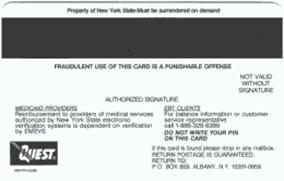
The Common Benefit Identification Non-Photo Card is a permanent plastic card issued to clients as determined by the Local Department of Social Services. This permanent card has no expiration date. Eligibility must be verified using the MEVS system.
|
|
|
|
COMMON BENEFIT IDENTIFICATION
NON-PHOTO CARD DESCRIPTION |
|
|
ID Number |
Eight-digit number assigned by
the State of |
|
Sex |
One letter character indicating
the sex of the client. This character is located on the same line as date of
birth. M = Male F = Female U = Unborn (Infant) |
|
Date of Birth |
Client’s date of birth,
presented in MM/DD/YY format. Example: August 15, 1980 is shown as
08/15/1980. Unborns (Infants) are identified by 00000000. The date is located
on the same line as sex. |
|
Last Name |
Last name of the client who will
use this card for services. |
|
First, M.I. |
First name and middle initial of
the person named above. |
|
ISO# |
Six-digit number assigned to the
New York State Department of Health (DOH). Disregard when manually entering
access number for Medicaid verification. |
|
Access Number |
Thirteen-digit number (including
the 2 digit sequence number) used for entry into the Medicaid Eligibility
Verification System. The access number is not used for billing. |
|
Sequence Number |
Two-digits at the end of the
access number. This is used in the entry process of access number and client
number (CIN) verifications. |
|
Magnetic Stripe |
Stripe with encoded information
that is read by the MEVS terminal. |
|
Signature Panel |
Must be signed by the individual
cardholder, parent or guardian to be valid for services. |
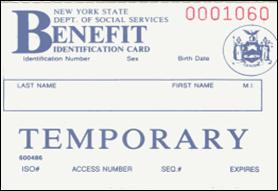
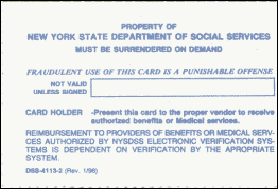
The Replacement Common Benefit Identification Card is a temporary paper card issued by the Local Department of Social Services to a client. This card will be issued when the Permanent Common Benefit Identification Card is lost, stolen or damaged. When using the MEVS terminal for eligibility verification, all information will need to be entered manually.
|
|
|
|
REPLACEMENT
COMMON BENEFIT IDENTIFICATION CARD DESCRIPTION |
|
|
ID Number |
Eight-digit number assigned by
the State of |
|
Sex |
One letter character indicating
the sex of the client. This character is located on the same line as date of
birth. M = Male F = Female U = Unborn (Infant) |
|
Date of Birth |
Client’s date of birth,
presented in MM/DD/YY format. Example: August 15, 1980 is shown as
08/15/1980. Unborns (Infants) are identified by 00000000. |
|
Name |
Name of the client who will be
able to use this card for services. |
|
ISO# |
Six-digit number assigned to the
New York State Department of Health (DOH). Disregard when manually entering
access number for Medicaid verification. |
|
Access Number |
Thirteen-digit number (including
the 2 digit sequence number) used for entry into the Medicaid Eligibility
Verification System. The access number is not used for billing. |
|
Sequence Number |
Two-digits at the end of the
access number. This number is used in the entry process of access number and
client number (CIN) verifications. |
|
Expiration Date |
Date the temporary card expires. |
|
Signature Panel |
Must be signed by the individual
cardholder, parent or guardian to be valid for services. |
Note: When verifying a client’s eligibility be aware of the expiration date on the front of the card. The card is not valid if the date has expired. A response “INVALID CARD THIS RECIPIENT” will be returned.
Verification requests for client eligibility may be entered into the MEVS system through a touch-tone telephone. This access method is suggested for providers with very low transaction volume (under 50 transactions per month). For convenience, providers with higher volumes should use the VeriFone Terminal or refer to Alternate Access to MEVS on page 1.0.2.
Access to the Telephone Verification
System (Rev. 02/05)
A
toll free number has been established for both
If you wish to be transferred directly to an eMedNY Provider Services Representative, you may press “0” on the telephone keypad at any time during the first four prompts.
The following message will be heard:
“The ARU Zero Out Option”
You will then be connected to the eMedNY Provider Services Helpdesk.
If you are unable to connect to MEVS by dialing the above primary number, dial the back-up number, 1-800-225-3040. This back-up number must only be used when the primary number is not working. Once you complete your verification, you must return to using the primary number.
If the connection is unsuccessful using either number, call Provider Services at 1-800-343-9000.
A regular touch-tone telephone is the only access to the Audio Response Unit (ARU). It can be identified by the push button dial and different tones when dialing or entering information into MEVS.
The telephone keypad has two keys with which you should become familiar:
• The *(asterisk) key is used to clear a mistake that you have made. Once the incorrect information is cleared, re-enter the correct information for that step.
Note: This key must be pressed before you press the # key.
The * (asterisk) key is also used to repeat the verification response.
• The # (pound) key separates information. It must be pressed after each piece of information is entered.
The access number is a thirteen-digit numeric identifier on the Common Benefit Identification Card that includes the sequence number. The easiest and fastest verification method is by using the access number.
The Medicaid number (CIN) is an eight-digit alpha/numeric identifier on the Common Benefit Identification Card. The Medicaid number (CIN) can also be used to verify a client’s eligibility. You must convert the eight-digit identifier to a number with eleven-digits. The three letters are the only characters converted in the number. You should refer to the chart below when converting the Medicaid number (CIN). For example:
A D 12345 Z = eight-digit Medicaid number (CIN)
21 31 12345 12 = becomes an eleven-digit number
For this example, the chart indicates that the letter A = 21, D = 31 and Z = 12. Replace the letters A, D and Z with the numbers 21, 31 and 12 respectively. The converted number is 21311234512
|
|
A |
= |
21 |
|
N |
= |
62 |
|
|
|
B |
= |
22 |
|
O |
= |
63 |
|
|
|
C |
= |
23 |
|
P |
= |
71 |
|
|
|
D |
= |
31 |
|
Q |
= |
11 |
|
|
|
E |
= |
32 |
|
R |
= |
72 |
|
|
|
F |
= |
33 |
|
S |
= |
73 |
|
|
|
G |
= |
41 |
|
T |
= |
81 |
|
|
|
H |
= |
42 |
|
U |
= |
82 |
|
|
|
I |
= |
43 |
|
V |
= |
83 |
|
|
|
J |
= |
51 |
|
W |
= |
91 |
|
|
|
K |
= |
52 |
|
X |
= |
92 |
|
|
|
L |
= |
53 |
|
Y |
= |
93 |
|
|
|
M |
= |
61 |
|
Z |
= |
12 |
|
Note: Perform the required conversion before dialing MEVS.
Instructions
for Completing a Telephone Transaction
• If using a CIN, be sure to convert the number before dialing. Refer to the chart on the previous page.
• Dial 1-800-997-1111.
• Once you have dialed and a connection is made, an Audio Response Unit (ARU) will prompt you for the input data that needs to be entered.
• If you wish to hear a prompt repeated, press *, (asterisk).
• To bypass a prompt, press #, (the pound key).
• To clear a mistake, press the * key and re-enter the correct information. This step is only valid if done prior to pressing the # key which registers the entry.
• Once you are familiar with the prompts and wish to make your entries without waiting for the prompts, just continue to enter the data in the proper sequence. As in all transactions (prompted or unprompted), press the # key after each entry.
• For assistance or further information on input or response messages, call the Provider Services staff at 1-800-343-9000.
• For some prompts, if the entry is invalid, the ARU will repeat the prompt. This allows you to correct the entry without re-keying the entire transaction.
• The call is terminated if excessive errors are made.
· To be transferred to an eMedNY Provider Services Representative, press “0” on the telephone keypad at any time during the first four prompts. The following message will be heard: “The ARU Zero Out Option”. You will then be transferred to the eMedNY Provider Services Helpdesk.
• If you will be entering co-payment information, be sure to convert the alpha co-payment type to a number, prior to dialing. Refer to Section 13.1 on page 13.0.1 for Co-payment Type codes.
• The following types of transactions cannot be processed via the telephone:
• Cancel Transactions
• Authorization Confirmation Transactions
• Dispensing Validation System Transactions
Note: Detailed instructions for entering a transaction begin on the next page. The Voice Prompt column lists the instructions you will hear once your call is connected. The Action/Input column describes the data you should enter.
|
VOICE PROMPT |
ACTION/INPUT |
|
|
TO BEGIN Dial
1-800-997-1111 |
|
|
None |
|
IF ENTERING ALPHA/NUMERIC IDENTIFIER, ENTER NUMBER
1 IF ENTERING NUMERIC IDENTIFIER, ENTER NUMBER 2 |
Enter 1,
If using converted CIN. Enter 2,
If using Access Number. |
|
ENTER IDENTIFICATION NUMBER |
Enter
converted alpha/numeric Medicaid number (CIN) or numeric access number. Press
#. |
|
ENTER NUMBER 1 FOR SERVICE AUTHORIZATION OR NUMBER
2 FOR ELIGIBILITY INQUIRY |
One of
the following transaction types must be entered: 1 To request
a Service Authorization as well as Eligibility Information. This must be used
to obtain a service authorization for Post and Clear (P & C) and
Utilization Threshold (UT). Co-payment entries may also be made using
this transaction type. 2 To request
Eligibility Information only. This may also be used to determine if
ordered/prescribed services are available for the client under the UT
program. Co-payment entries can also be made using this transaction type. |
|
ENTER SEQUENCE NUMBER |
If the
Identification Number entry was a Medicaid Number (CIN), enter the two-digit
sequence number. No entry
is necessary if the numeric Access Number was entered. Press # to bypass the
prompt. |
|
ENTER DATE |
Press #
for today's date or enter MMDDYY for a previous date of service. For all
inpatient co-payment entries, the date should equal the discharge date. |
|
ENTER PROVIDER NUMBER |
Enter
the eight-digit provider identification number assigned at the time of
enrollment in the NYS Medicaid Program. |
|
ENTER SPECIALTY CODE |
Enter
the three-digit MMIS specialty code that describes the type of service that will
be rendered and press #. If you are providing a service that is exempt from
the UT program or you are a clinic or hospital clinic using a transaction
type 1, a code MUST be entered. If you
do not have a specialty code, press # to bypass this prompt. |
|
ENTER REFERRING PROVIDER NUMBER |
Must be
entered if the client is in the Restricted Recipient Program and the transaction is not done by the
primary provider. Enter the Medicaid provider number of the primary provider
and press #. If a client enrolled in the Managed Care Coordinator Program
(MCCP) is referred to you by the primary provider, you must enter that
provider's ID number in response to this prompt. If the
client is not a referral, press the # key to bypass this prompt. |
|
ENTER FIRST CO-PAYMENT TYPE |
Enter
the alpha converted co-payment type. Refer to Section 13.1 on page 13.0.1 for Co-payment
Type codes. If the
service you are rendering does not require co-payment, or if the client is
exempt or has met their co-payment maximum responsibility, bypass all the
co-payment prompts by pressing #. |
|
ENTER CO-PAYMENT UNITS |
Enter
the number of units being rendered. Only a one or two-digit numeric entry is acceptable. If the
first entry is valid, you will be prompted to enter “SECOND CO-PAYMENT TYPE”,
then a “THIRD CO-PAYMENT TYPE” and finally “FOURTH CO-PAYMENT TYPE”. The
additional co-payment prompts would be used by a provider who is rendering
more than one co-payment type of service. If not applicable, press # to
bypass the rest of the co-payment prompts. |
|
ENTER SECOND CO-PAYMENT TYPE |
Enter
the alpha converted co-payment type for the second co-payment and press #. |
|
ENTER CO-PAYMENT UNITS |
Enter
the number of units being rendered. Only a one or a two-digit numeric entry
is acceptable. Press #. |
|
ENTER THIRD CO-PAYMENT TYPE |
Enter
the alpha converted co-payment type for the third co-payment and press #. |
|
ENTER CO-PAYMENT UNITS |
Enter the
number of units being rendered. Only a one or two-digit numeric entry is
acceptable. Press #. |
|
ENTER FOURTH CO-PAYMENT TYPE |
Enter
the alpha converted co-payment type for the fourth co-payment and press #. |
|
ENTER CO-PAYMENT UNITS |
Enter the
number of units being rendered. Only a one or two-digit numeric entry is
acceptable. Press #. |
|
ENTER NUMBER OF SERVICE UNITS |
Enter
the total number of service units rendered and press #. If you are performing
an eligibility inquiry only, press # to bypass this prompt. |
|
IF YOU ARE A DESIGNATED POSTING PROVIDER, ENTER
NUMBER OF LAB TESTS YOU ARE ORDERING |
If you are a designated Posting Provider, enter the total number of Lab tests being ordered
and press #, or press # to bypass. |
|
IF YOU ARE A DESIGNATED POSTING PROVIDER ENTER
NUMBER OF PRESCRIPTIONS OR OVER THE COUNTER ITEMS YOU ARE ORDERING |
If you are a designated Posting Provider, enter the total number or prescriptions or over the
counter items being ordered and press #, or press # to bypass. |
|
ENTER ORDERING PROVIDER NUMBER |
Enter
the MMIS Provider ID of the ordering provider and press #. All providers who
fill written orders/scripts must complete this field. If you do
not have the provider number of the ordering provider, you may enter the
profession code and license number. If entering a license number for Out of State License # 0606251345678 Nurse Practitioner # 04233421212 Press # to bypass this prompt if you are not a
dispensing provider. |
|
NOTE: When entering a profession code and license number,
the last six positions of the entry should be the actual numeric license
number. If the license number does not contain six numbers, zero fill the appropriate
positions preceding the actual license number. For example, an entry for an
Optometrist whose license number is V867 would be: 05683000867 (Profession
Code + V + Zero fill + License Number). |
|
THIS IS THE LAST PROMPT YOU WILL
HEAR. THE MEVS SYSTEM WILL NOW RETURN YOUR RESPONSE.
THIS ENDS THE INPUT DATA SECTION.
AN ELIGIBILITY SERVICE AUTHORIZATION RESPONSE THAT CONTAINS NO ERRORS WILL BE RETURNED IN THE FOLLOWING SEQUENCE.
Note: Although all types of eligibility coverages are listed below, only one will be returned in the response.
|
MESSAGE
SEQUENCE |
RESPONSE |
DESCRIPTION/COMMENTS |
|
CIN |
MEDICAID NUMBER AA22346D |
The response begins with the client’s eight-digit
Medicaid CIN. |
|
|
COUNTY CODE XX |
The two-digit code which indicates the client’s
county of fiscal responsibility. Refer to Section 13.4 on page 13.4.1 for county
codes. |
|
CLIENT’S
MEDICAID COVERAGE |
COMMUNITY COVERAGE WITH COMMUNITY BASED LONG TERM
CARE |
Client is eligible to receive most Medicaid
services. Client is not eligible for
nursing home services in a SNF or inpatient setting except for short-term
rehabilitation nursing home care in a SNF.
Short-term rehabilitation nursing home care means one admission in a
12-month period of up to 29 consecutive days of nursing home care in a
SNF. Client is not eligible for
managed long-term care in a SNF, hospice in a SNF, intermediate care facility
services and waiver services provided under the Long Term Home Health Care
Program, Traumatic Brain Injury Program, Care at Home Waiver Program and the
Office of Mental Retardation and Developmental Disabilities Home and
Community-Based Waiver Program. |
|
CLIENT’S
MEDICAID COVERAGE (contd.) |
COMMUNITY COVERAGE WITHOUT LONG TERM CARE |
Client is eligible for acute inpatient care, care in
a psychiatric center, some ambulatory care, prosthetics, and short-term
rehabilitation services. Short-term
rehabilitation services include one admission in a 12-month period of up to
29 consecutive days of short-term rehabilitation nursing home care in a SNF,
and one commencement of service in a 12-month period up to 29 consecutive
days of certified home health agency services. Client is not eligible for adult day health
care, Assisted Living Program, certified home health agency services except
short-term rehabilitation, hospice, managed long-term care, personal care,
consumer directed personal assistance program, limited licensed home care,
personal emergency response services, private duty nursing, nursing home
services in a SNF other than short-term rehabilitation, nursing home services
in an inpatient setting, intermediate care facility services, residential
treatment facility services and services provided under the Long Term Home
Health Care Program, Traumatic Brain Injury Program, Care at Home Waiver
Program and the Office of Mental Retardation and Developmental Disabilities
Home and Community-Based Waiver Program. |
|
|
ELIGIBLE CAPITATION GUARANTEE |
A response of “Eligible Capitation Guarantee” indicates
guaranteed status under a Prepaid Capitation Program (PCP). The PCP provider
is guaranteed the capitation rate for a period of time after a client becomes
ineligible for Medicaid services. Clients enrolled in some PCPs are eligible
for some fee-for-service benefits if referred by the PCP provider. To
determine exactly what services are covered, contact the PCP designated in
the insurance code field. |
|
CLIENT’S
MEDICAID COVERAGE (contd.) |
ELIGIBLE EXCEPT NURSING FACILITY SERVICES |
Client is eligible to receive all Medicaid services except
nursing home services provided in an SNF or inpatient setting and/or waiver
services provided under the Long Term Health Care Program, Traumatic Brain Injury Program, Care
at Home Waiver Program and the Office of Mental Retardation and Developmental
Disabilities Home and Community-Based Waiver Program. All
pharmacy, physician, ambulatory care services and inpatient hospital
services, not provided in a nursing home, are covered. |
|
|
ELIGIBLE ONLY FAMILY PLANNING SERVICES |
The Family Planning Benefit Program provides Medicaid
coverage for family planning services to persons of childbearing age with
incomes at or below 200% of the federal poverty level. Eligible recipients (males and females)
have access to all enrolled Medicaid family planning providers and family
planning services currently available under Medicaid. |
|
|
ELIGIBLE ONLY OUTPATIENT CARE |
Client is eligible for all ambulatory care,
including prosthetics; no inpatient coverage. |
|
|
ELIGIBLE PCP |
A response of “Eligible PCP” indicates coverage
under a Prepaid Capitation Program (PCP). This status means the client is PCP
eligible as well as eligible for limited fee-for-service benefits. To determine
exactly what services are covered, listen to the PCP services returned in the
response. If further clarification is needed, contact the PCP designated in
the insurance code field. |
|
CLIENT’S
MEDICAID COVERAGE (contd.) |
EMERGENCY SERVICES ONLY |
Client is eligible for emergency services from the
first treatment for the emergency medical condition until the condition
requiring emergency care is no longer an emergency. An emergency is defined
as a medical condition (including emergency labor and delivery) manifesting
itself by acute symptom of sufficient severity (including severe pain), such
that the absence of immediate medical attention could reasonably be expected
to place the patient’s health in serious jeopardy, serious impairment of
bodily functions or serious dysfunction of any body organ or part. |
|
|
FAMILY HEALTH PLUS |
Client is enrolled in the Family Health Plus
Program (FHP) and receives all services through a FHP participating Managed Care
Plan. The Medicaid Program does not reimburse for any service that is
excluded from the benefit package of the FHP Managed Care Plan. |
|
|
MEDICAID ELIGIBLE |
Client is eligible for all benefits. |
|
|
MEDICAID ELIGIBLE HR UTILIZATION THRESHOLD |
Client is eligible to receive all Medicaid services
with prescribed limits for physician, psychiatric and medical clinic,
laboratory, dental clinic and pharmacy services. A service authorization must
be obtained. |
|
|
MEDICARE COINSURANCE AND DEDUCTIBLE ONLY |
Client is eligible for payment of Medicare
coinsurance and deductible only. Deductible and coinsurance payments will be
made for Medicare approved services only. |
|
|
OUTPATIENT COVERAGE WITH COMMUNITY BASED LONG TERM
CARE |
Client is eligible for most ambulatory care,
including prosthetics, and one admission in a 12-month period of up to 29
consecutive days of short-term rehabilitation nursing home care in a
SNF. Client is not eligible for
inpatient care other than short-term rehabilitation nursing home care in a
SNF. Client is not eligible for waiver
services provided under the Long Term Home Health Care Program, Traumatic
Brain Injury Program, Care at Home Waiver Program and the Office of Mental
Retardation and Developmental Disabilities Home and Community-Based Waiver
Program. |
|
CLIENT’S
MEDICAID COVERAGE (contd.) |
OUTPATIENT COVERAGE WITHOUT LONG TERM CARE |
Client is eligible for some ambulatory care,
including prosthetics, and short-term
rehabilitation services. Short-term
rehabilitation services include one admission in a 12-month period of up to
29 consecutive days of short-term rehabilitation nursing home care in a SNF
and one commencement of service in a 12-month period of up to 29 consecutive
days of certified home health agency services. Client is not eligible for inpatient
coverage other than short-term rehabilitation nursing home care in a
SNF. Client is not eligible for adult
day health care, Assisted Living Program, certified home health agency except
short-term rehabilitation, hospice, managed long-term care, personal care,
consumer directed personal assistance program, limited licensed home care,
personal emergency response services, private duty nursing, and waiver
services provided under the Long Term Home Health Care Program, Traumatic
Brain Injury Program, Care at Home Waiver Program and the Office of Mental
Retardation and Developmental Disabilities Home and Community-Based Waiver
Program. |
|
|
OUTPATIENT COVERAGE WITH NO NURSING FACILITY
SERVICES |
Client is eligible for all ambulatory care,
including prosthetics. Client is not
eligible for inpatient coverage or waiver services provided under the Long
Term Home Health Care Program, Traumatic Brain Injury Program, Care at Home
Waiver Program and the Office of Mental Retardation and Developmental
Disabilities Home and Community-Based Waiver Program. |
|
|
Client is eligible to receive a limited package of benefits.
The following services are excluded: podiatry, long- term home health care,
long term care, hospice, ophthalmic services, DME, therapy (physical, speech,
and occupational), abortion services, and alternate level care. |
|
|
CLIENT’S
MEDICAID COVERAGE (contd.) |
PRESUMPTIVE ELIGIBLE LONG-TERM/HOSPICE |
Client is eligible for all Medicaid services except
hospital based clinic services, hospital emergency room services, hospital
inpatient services, and bed reservation. |
|
|
PRESUMPTIVE ELIGIBILITY PRENATAL A |
Client is eligible to receive all Medicaid services
except inpatient care, institutional long-term care, alternate level care,
and long-term home health care. |
|
|
PRESUMPTIVE ELIGIBILITY PRENATAL B |
Client is eligible to receive only ambulatory
prenatal care services. The following services are excluded: inpatient
hospital, long-term home health care, long-term care, hospice, alternate
level care, ophthalmic, DME, therapy (physical, speech, and occupational),
abortion, and podiatry. |
|
ANNIVERSARY
MONTH |
ANNIVERSARY MONTH OCTOBER |
This is the beginning month of the client’s benefit
year. |
|
CATEGORY
OF ASSISTANCE |
CATEGORY OF ASSISTANCE “S” |
The code S signifies that the client is enrolled in
the SSI assistance program. |
|
MEDICARE
DATA |
Identifies the Medicare coverage for which the
client is eligible, for the date of service entered. |
|
|
|
MEDICARE PART A |
Client has only Part A Medicare (inpatient
hospital). |
|
|
MEDICARE PART B |
Client has only Part B Medicare (outpatient). |
|
|
MEDICARE PARTS A and B |
Client has both Parts A and B Medicare Coverage. |
|
|
MEDICARE PARTS A & B & QMB |
Client has Part A and B Medicare coverage and is a
Qualified Medicare Beneficiary (QMB). |
|
|
MEDICARE PART A & QMB |
Client has Part A Medicare coverage and is a
Qualified Medicare Beneficiary (QMB). |
|
|
MEDICARE PART B & QMB |
Client has Part B Medicare coverage and is a
Qualified Medicare Beneficiary (QMB). |
|
MEDICARE
DATA (contd.) |
MEDICARE QMB Only |
Client is a Qualified Medicare Beneficiary (QMB)
Only. |
|
|
MEDICARE PART D |
Client has only Part D Medicare coverage
(prescription drugs). |
|
|
MEDICARE PARTS A & D |
Client has both Part A and Part D Medicare coverage
(inpatient hospital and prescription drugs). |
|
|
MEDICARE PARTS B & D |
Client has both Part B and Part D Medicare coverage
(outpatient and prescription drugs). |
|
|
MEDICARE PARTS A & B & D |
Client has Part A and Part B and Part D Medicare coverage
(inpatient hospital, outpatient and prescription drugs). |
|
|
MEDICARE PARTS A & B & D & QMB |
Client has Part A and Part B and Part D Medicare
coverage (inpatient hospital, outpatient and prescription drugs) and is a
Qualified Medicare Beneficiary (QMB). |
|
|
MEDICARE PARTS A & D & QMB |
Client has Part A and Part D Medicare coverage
(inpatient hospital and prescription drugs) and is a Qualified Medicare
Beneficiary (QMB). |
|
|
MEDICARE PARTS B & D & QMB |
Client has Part B and Part D Medicare coverage
(outpatient and prescription drugs) and is a Qualified Medicare Beneficiary
(QMB). |
|
|
MEDICARE PART D & QMB |
Client has Part D Medicare coverage (prescription drugs)
and is a Qualified Medicare Beneficiary (QMB). |
|
|
HEALTH INSURANCE CLAIM NUMBER XXXXXXXXXXXX |
Actual Health Insurance Claim number consisting of
up to twelve-digits. If a number is not available, the following message will
be returned. |
|
|
HEALTH INSURANCE CLAIM NUMBER NOT ON FILE |
Actual Health Insurance Claim number is not on
file. |
|
THIRD
PARTY INSURANCE AND COVERAGE CODES |
INSURANCE COVERAGE CODE 21: DENTAL, PHYSICIAN,
INPATIENT |
Insurance and Coverage Codes equal the Insurance carrier
and the scope of benefits. You will hear a two character insurance code and
up to 13 coverage code descriptions. If you hear a third insurance code of ZZ
call 1-800-343-9000 to obtain additional insurance and coverage information.
Refer to your MMIS Provider Manual for insurance codes. Refer to Section 13.6
on page 13.6.1, for the Codes
Section for definitions/descriptions. |
|
EXCEPTION
RESTRICTION CODES |
EXCEPTION CODE 35 |
If applicable, a client’s exception and/or
restriction code will be returned. Refer to Section 13.5 on page 13.5.1, for the Exception
Codes for the definitions/descriptions. |
|
CO-PAY
DATA |
NO CO-PAYMENT REQUIRED |
This message will be heard if the client is under
21 or exempt from co-payment and co-payment data has been entered. |
|
|
CO-PAYMENT REQUIREMENTS MET ON MM/DD/YY |
Client has reached his/her co-payment maximum. The
date equals the date of inquiry, which brought the co-payment over the
maximum. You should not collect the co-payment until the next co-payment
period. |
|
UTILIZATION
THRESHOLD POST AND CLEAR DATA |
AT SERVICE LIMIT |
The client has reached his/her limit for that
particular service category. No service authorization is created. The service
is not approved and payment by
Medicaid will not be made. Refer
to your MMIS manual if the patient has either an emergency or medically
urgent situation. |
|
UTILIZATION
THRESHOLD POST AND CLEAR DATA (contd.) |
DUPLICATE - UT PREVIOUSLY APPROVED |
The service authorization request is a duplicate of
a previously approved service authorization request for a given provider,
client, and date of service. |
|
|
PARTIAL APPROVAL XX SERVICE UNIT(S) POST AND CLEAR |
Indicates that the full complement of requested
services relative to Post and Clear processing is not available. The XX represents the number of services approved/available. |
|
|
PARTIAL APPROVAL XX SERVICE UNIT(S), XX LAB
UNIT(S), XX PHARMACY UNIT(S) UTILIZATION THRESHOLD |
Indicates that the full complement of requested
services relative to Utilization Threshold processing is not available. The XX represents the number of services
approved/available. |
|
|
SERVICE APPROVED NEAR LIMIT XX SERVICE UNIT(S), XX
LAB UNIT(S), XX PHARMACY UNIT(S) |
The service authorization has been granted and
recorded. The client has almost reached his/her service limit. For the
convenience of the provider and the client, this message also indicates that
the patient is using services at a rate that could exhaust his/her limit for
that particular service category. |
|
|
SERVICE APPROVED UTILIZATION THRESHOLD XX SERVICE UNIT(S),
XX LAB UNIT(S), XX PHARMACY UNIT(S) |
The service units requested are approved, as the
client has not utilized his/her UT limit. A service authorization will be
created. |
|
|
SERVICES APPROVED POST AND CLEAR XX SERVICE
UNIT(S), XX LAB UNIT(S), XX PHARMACY UNIT(S) |
The ordering provider has posted services and those
service units have been approved. This message will also be returned for all
providers who are designated card swipers, except pharmacy, for Tran Type 1
entry. |
|
DATE OF
SERVICE |
FOR DATE MMDDYY |
This will be heard when the message is complete and
reflects the date for which services were requested. You can repeat the message one time by pressing the * key. |
Note: You will be allowed to perform a maximum of three transactions during a single call. If less than three transactions have been completed, you will automatically be prompted for another transaction. If no other transactions are needed, disconnect your call.
The next few pages contain processing error and denial messages that may be heard. Error responses are heard immediately after an incorrect or invalid entry. To change the entry, enter the correct data and press the # key. Denial responses are heard when the transaction is rejected due to the type of invalid data entered. The entire transaction must be reentered.
|
RESPONSE |
DESCRIPTION/COMMENTS |
|
CALL 800-343-9000 |
When
certain conditions are met (ex: multiple responses), you are instructed to
call the Provider Services staff for additional data. |
|
DECEASED ORDERING PROVIDER |
The
License Number or eight-digit MMIS Provider ID that was entered in the ordering
provider field is in a deceased status on the Master file and cannot
prescribe. Check the number entered. If a license number was entered, make
sure the correct profession code/license number combination and format was
entered. |
|
DISQUALIFIED ORDERING PROVIDER |
The
License Number or eight-digit MMIS Provider ID that was entered in the
ordering provider field is in a disqualified status on the Master file and
cannot prescribe. Check the number entered. If a license number was entered, make
sure the correct profession code/license number combination and format was
entered. |
|
EXCESSIVE ERRORS, REFER TO MEVS MANUAL OR CALL
800-343-9000 FOR ASSISTANCE |
Too many
invalid entries have been made during the transaction. Refer to Section 3.3
on page 3.3.1 for the input
data section, or call 800-343-9000. |
|
INVALID ACCESS METHOD |
The
received transaction is classified as a Provider Type/Transaction Type Combination
that is not allowed to be submitted through the telephone. For
example: a Pharmacy can submit an eligibility transaction via the telephone
but cannot submit a Service Authorization Transaction unless exempt from the
ProDUR Program. |
|
INVALID ACCESS NUMBER |
An
invalid access number was entered. Check the number and retry the
transaction. |
|
INVALID
CARD THIS RECIPIENT |
Client
has used an invalid card. Check the number you have entered against the client’s
Common Benefit Identification Card. If they agree, the client has been issued
a new and different Benefit Identification Card and must produce the new card
prior to receiving services. |
|
INVALID CO-PAYMENT |
This
message is heard at the prompt if the data entered is not in the correct
format (invalid number of digits or number doesn't covert to an alpha
character). Receiving this message will prohibit the next prompt from being
spoken. To proceed, re-enter the data in the correct format. |
|
INVALID CO-PAYMENT, REFER TO MEVS MANUAL |
The Data
entered is not a valid co-payment value. Refer to Section 13.0 on page 13.0.1 for the Codes
Section. |
|
INVALID DATE |
An illogical
date or a date which falls outside of the allowed MEVS inquiry period was
entered. The allowed period is 24 months retroactive from the entry date. |
|
INVALID ENTRY |
An
invalid number of digits was entered for service units. Service units must be
one or two-digits. |
|
INVALID IDENTIFICATION NUMBER |
The
client identification number entered was an incorrect length, or an invalid
alpha converted number was entered. |
|
INVALID PROFESSION CODE |
The Profession
Code entered in the ordering provider field is not a valid value. Refer to the eMedNY website at http://www.emedny.org for a list of valid Profession Codes. |
|
INVALID MEDICAID NUMBER |
An
invalid CIN was entered. Refer to the alpha
conversion chart on page 3.2.1 in the beginning of this manual. Verify that the
CIN was correctly converted to an eleven-digit number. |
|
INVALID MENU OPTION |
An
invalid entry was made when selecting the identifier type. The entry must be
1 (alphanumeric identifier) or 2 (numeric identifier). |
|
INVALID ORDERING PROVIDER NUMBER |
The license
number or MMIS Provider ID number that was entered in the ordering provider
field was not found on the license or provider files. |
|
INVALID PROVIDER NUMBER |
The
provider number entered is an invalid eight-digit number. |
|
INVALID REFERRING PROVIDER NUMBER |
The
referring provider ID number was entered incorrectly or is not a valid MMIS
Provider ID number. A license number cannot be entered in this field. |
|
INVALID SEQUENCE NUMBER |
The
sequence number entered is not valid or not current. Check the client’s card
for the current sequence number. |
|
INVALID SPECIALTY CODE |
The
specialty code was either entered incorrectly, or not associated with the
provider’s category of service, or the provider is a clinic and a required
specialty was not entered. |
|
MCCP RECIPIENT NO
AUTHORIZATION |
Services
must be provided, ordered, or referred by the primary provider. Enter the
MMIS Provider ID of the primary provider to whom the client is restricted. |
|
NO
COVERAGE EXCESS INCOME |
Client
has income in excess of the allowable levels. All other eligibility
requirements have been satisfied. This individual will be considered eligible
for Medicaid reimbursable services only at the point his or her excess income
is reduced to the appropriate level. The individual may reduce his or her
excess income by paying the amount of the excess to the Local Department of
Social Services, or by submitting bills for the medical services that are at
least equal to the amount of the excess income. Medical services received
prior to meeting the excess income amount can be used to reduce the amount of
the excess. |
|
NO
COVERAGE PENDING FAMILY HEALTH PLUS |
Client
is waiting to be enrolled into a Family Health Plus Managed Care Plan. No
Medicaid services are reimbursable. |
|
NO SERVICE UNITS ENTERED |
No entry
was made and the units are required for this transaction. |
|
NOT
MEDICAID ELIGIBLE |
Client
is not eligible for benefits on the date requested. Contact the client’s
Local Department of Social Services for eligibility discrepancies. |
|
PRESCRIBING PROVIDER LICENSE NOT IN ACTIVE STATUS |
The
license number entered in the ordering provider field is on the license file
but is not active for the date of service entered. |
|
PROVIDER INELIGIBLE FOR SERVICE ON DATE PERFORMED |
The
Category of Service for the Provider number submitted in the transaction is
inactive or invalid for the entered Date of Service. This message will also
be returned if Specialty Codes 760 (Clinic Pharmacy) or 307 (DME) are entered
in the transaction and the associated Category of Service is not on file or
is invalid for the entered Date of Service. |
|
PROVIDER NOT ELIGIBLE |
The
verification was attempted by an inactivated or disqualified provider. |
|
PROVIDER NOT ON FILE |
The
provider number entered is not identified as a Medicaid enrolled provider.
Either the number is incorrect or not on the provider master file. |
|
RECIPIENT NOT ON FILE |
Client
identification number (CIN) is not on file. The number is either incorrect or
the client is no longer eligible and the number is no longer on file. |
|
REENTER ORDERING PROVIDER NUMBER |
The
license number or provider number entered in the ordering provider field has
the incorrect format (wrong length or characters in the wrong position). |
|
RESTRICTED RECIPIENT NO
AUTHORIZATION |
This
client is restricted to services from a specific provider. Enter the MMIS
Provider ID to whom the client is restricted. |
|
SERVICES
NOT ORDERED |
The
ordering provider did not post the services you are trying to clear. Contact
the ordering provider. |
|
SSN ACCESS NOT ALLOWED |
The
provider is not authorized to access the system using a social security
number. The Medicaid Number (CIN) or Access Number must be entered. |
|
SSN NOT ON FILE |
The
entered nine-digit number is not on the Client Master file. |
|
SYSTEM ERROR # |
A
network problem exists. Call 1-800-343-9000 with the error number. |
|
THE SYSTEM IS CURRENTLY UNAVAILABLE. PLEASE CALL
800-343-9000 FOR ASSISTANCE. |
The
system is currently unavailable. After
this message is voiced, you will be disconnected. |
The VeriFone terminal is designed to provide an accurate and timely verification of a client’s eligibility for Medicaid services. Specific features and conveniences, such as a large LCD screen, ATM style buttons and a built in printer, make the verification process easy to learn and use with a minimum of training time.
Multiple provider identification numbers can be programmed into the VeriFone terminal in the Provider Menu. When programmed, the two-digit shortcut code assigned to that Provider can be selected, instead of entering the full eight-digit Provider ID number. Refer to Section 7.3 on page 7.3.1 for Instructions for Provider Menu or call 1-800-343-9000 for assistance in adding multiple provider numbers to your terminal.
The Quick Start (Refer to Section 5.0 on page 5.0.1) is a quick and easy way to install the VeriFone Omni 3750 terminal. For step-by-step instructions use the VeriFone Installation Instructions (Refer to Section 7.0 on page 7.0.1).
Initial
Screen
When the VeriFone Omni 3750 terminal is not actively being used, the device normally shows its “initial screen” (see below). This screen is referenced often in this manual. To get to this screen in most circumstances, press the red cancel key.
Initial screen example:
FRI 9/5 9-13A
EMEDNY
SWIPE CARD OR
PRESS F4 TO BEGIN
Vxxxx
The “xxxx” in “Vxxxx” on the bottom line is the software version the terminal is using. This number may be needed when calling provider services for assistance.
The Quick Start is an easy way to setup up the VeriFone Omni 3750 terminal. For a full and detailed description of the terminal refer to Section 6.0 on page 6.0.1 for the VeriFone Omni 3750 Terminal.
1. Select a location that has access to a power outlet and a telephone line for your terminal. Open the box and unpack the terminal. (Refer to Section 7.0 on page 7.0.1 for the VeriFone Installation Instructions for step-by-step instructions).
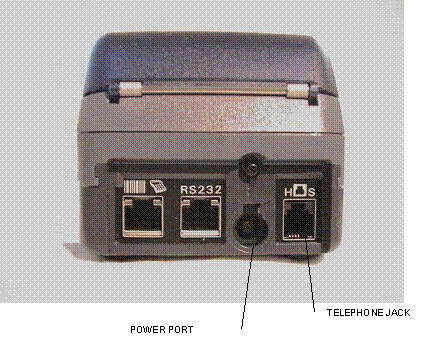
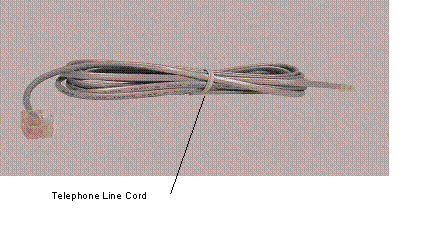
2. Connect the telephone line cord into the telephone jack labeled ‘H S’. Connect the other end into the wall jack. (Refer to Section 6.2 on page 6.0.3 for the VeriFone Omni 3750 Terminal – Back).
3. Connect the power connector into the power port on the back of the terminal, and the power cord into the power pack. Plug the three-prong power cord into the power outlet. (Refer to Section 6.2 on page 6.0.3 for the VeriFone Omni 3750 Terminal – Back).
4. After the device has gone through its start-up routine, the day, date, and time is displayed on the top line of the terminal.
Note: The terminal uses it’s internal clock to calculate the date that will be entered on your transaction. Please ensure that the Day, Date and Time are correct. For instructions on resetting Day, Date and Time, please refer to Section 7.1 on page 7.1.1.
5. The terminal will arrive with the requestor’s Provider number pre-programmed. It is recommended to review the Medicaid Provider number before using the terminal. Press the P2 key (labeled “Provider”) to enter the Provider Menu. “Provider Setup” is briefly displayed. When the Password prompt is displayed, enter the following six-digit number ‘123456’ and press the ENTER key. When the terminal displays “ENTER PROVIDER NUMBER”, enter the two-digit number ‘01’ and press the ENTER key. “PROVIDER NUMBER 01” is displayed with the pre-programmed Provider number below the text.
6. To use the pre-programmed Provider number, press the CANCEL/CLEAR key, to return to the initial screen. To change the pre-programmed Provider number, press the BACKSPACE key eight times to clear the number. Then enter the eight-digit Medicaid Provider number and press the ENTER key. If you have no additional Provider numbers to enter, press the CANCEL/CLEAR key. To store additional Provider numbers refer to Section 7.3 on page 7.3.1 for Instructions for Provider Menu.
7. If you are required to dial a number to get an outside line (e.g. ‘9’), press the P1 key (labeled “Setup”) to enter the Setup Menu. When the Password prompt is displayed, enter the following six-digit number ‘123456’ and press the ENTER key. The “DIAL PREFIX” is displayed, enter the access code (e.g. single digit “9”) and press the ENTER key. After the access code has been entered, press the CANCEL/CLEAR key to return to the Initial Screen. (Refer to Section 7.2 on page 7.2.1 for Instructions for Setup Menu).
8.
Press the F4 key or swipe the CBIC card
in the Magnetic Card Reader to begin processing transactions to eMedNY.
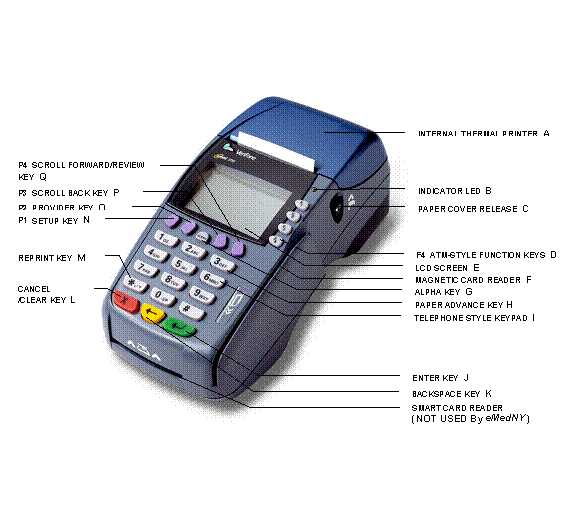
The VeriFone Omni 3750 terminal is a verification device that uses basic telephone outlets to connect with Medicaid Eligibility Verification System (MEVS).
 VeriFone
Omni 3750 Terminal - Front
VeriFone
Omni 3750 Terminal - Front|
INTERNAL THERMAL PRINTER |
A dot
matrix printer in which heat is applied to the pins of the matrix to form
dots on heat-sensitive paper. |
|
|
B. |
Indicator
LED |
Power and Paper Indicator. NOTE: A
blinking light indicates to check paper supply or paper is not inserted
properly. |
|
C. |
Paper Cover Release |
Open the
printer paper compartment. |
|
D. |
f4 ATM-STYLE FUNCTION Key |
Starts a verification transaction through entry of the
access number or Medicaid Number (CIN). |
|
E. |
LCD Screen |
The
verification response and system messages will be displayed in this area. |
|
F. |
Magnetic Card Reader |
Slot
that reads the magnetic stripe on the back of the card. This allows for
quicker entry of verification transactions. |
|
G. |
ALPHA Key |
Converts
numeric digits to alphabetic letters. |
|
H. |
PAPER ADVANCE Key |
Press the 3 Key from the initial screen to advance the
paper one line at a time. |
|
I. |
TELEPHONE STYLE KEYPAD |
Area where
user enters data needed for the Medicaid verification. |
|
J. |
ENTER KEY |
Inputs new data into the system. |
|
K. |
BACKSPACE KEY |
Erases the last numeric digit or alphabetic letter
entered. |
|
L. |
CANCEL/CLEAR Key |
Erases all
previously entered data and returns to the ready mode. |
|
M. |
reprint key |
From the initial screen, prints a duplicate copy of the
verification message. |
|
N. |
P1 SETUP Key |
Allows modification of the Terminal Settings. (Refer to
Section 7.2 on page 7.2.1 for the Instructions for Setup Menu) |
|
O. |
P2 Provider Key |
Allows for add, update, delete, and review of multiple
provider Ids. (Refer to Section 7.3 on page 7.3.1 for the Instructions for Provider Menu) |
|
P. |
P3 Scroll Back
Key |
Facilitates scrolling to the previous line, if applicable. |
|
Q. |
P4 Scroll
Forward/REVIEW Key |
Facilitates scrolling to the next line, if applicable.
Also is used to review the previous transaction. (Refer to Section 12.0 on
page 12.0.1 for the Review Function) |
Telephone
Line Cord
Power Pack
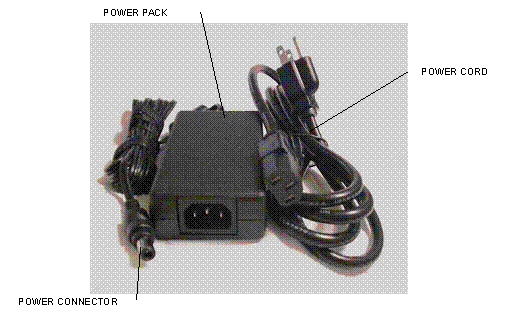
These instructions will assist with the setup of the VeriFone Omni 3750 terminal. Select a location that has access to a power outlet and a telephone line for your terminal.
Connecting
the Telephone Line
1. Connect one end of the telephone line cord to the telephone jack labeled “H S” on the right hand side at the rear of the terminal
2. Connect the other end of the telephone line cord to your RJ11-type modular telephone wall jack. If you do not have a telephone wall jack, obtain an adapter from your local telephone company.
Connecting
the Terminal Power Pack
1. Connect the power connector into the power port.
2. To lock the power connector, align the plastic lock tab pointing up and turn to the left. To unlock the power connector, turn to the right.
3. Connect the power cord into the power pack.
4.
Plug the three-prong AC power cord into an
indoor 120-volt AC outlet.
WARNING: Do not plug the power pack into an outdoor outlet or operate the terminal outdoors.
Inserting
Thermal Paper into the Internal Thermal Printer
1. To open the printer paper compartment, press the Paper Cover Release button located on the right side of the terminal.
2. Insert a roll of thermal paper, and ensure paper feeds from underneath. (See illustration 2b of the Quick Instruction Guide provided with the new device).
3. Press down to close the printer paper compartment.
Ordering
Thermal Paper
for the Internal Thermal Printer
To order additional thermal paper (2.25 Inches by 85 Feet thermal paper), contact TASQ Technology at 1-800-420-3197 or your nearest office supply store.
To set or reset the day, date, and time follow the Display/Action table.
|
DISPLAY |
ACTION |
|
The
Initial Screen is displayed. |
Press the F2 and F4
key at the same time |
|
SYSTEM
MODE ENTRY PASSWORD |
Enter “Z66831” (1-alpha-alpha
66831) and press the ENTER key |
|
SYS MODE
MENU 1 |
Press the F3 key for CLOCK |
|
SYS MODE
CLOCK YEAR:
YYYY MONTH:
MM DAY: DD |
Enter
the current date as “CCYYMMDD“ |
|
|
Press
the P2 key labeled Provider. |
|
SYS MODE
CLOCK HOUR: HH MINUTE:
MM |
Enter
Time as “HHMM” Enter HH
in 24-Hour clock format (e.g.
1:00 p.m. HOUR: 13 MINUTE:
00) Press
the ENTER key to Save and Exit |
|
SYS MODE
MENU 1 |
Press
the F4 key to restart the device |
|
Initial
screen |
|
Access this menu by pressing the P1 key labeled as the Setup Menu. This menu allows the user to modify several variables that the device uses. To edit the Setup Menu follow the Display/Description/Action table.
Press the CANCEL/CLEAR
key to return to the initial screen.
|
DISPLAY |
DESCRIPTION |
ACTION |
|
Initial Screen |
|
Press the P1 key to enter
the Setup Menu |
|
Terminal Setup ENTER PASSWORD |
|
Enter the following six-digit
number ‘123456’ and press the ENTER key. |
|
DIAL PREFIX ## ----------------- |
The Dial Prefix is dialed before
the telephone number. If a value has already been
entered, it will display on the second line (“##”). |
If you are required to dial a
number (e.g. ‘9’) to get an outside line, enter the access code here (e.g.
single digit “9”) and press the ENTER key. After the access code has been
entered, press the CANCEL/CLEAR key. |
|
ENTER NYM TELE # 1-866-828-4814 ------------------------ |
This is the number the device
will dial to submit transactions. |
Press the ENTER key to
continue. If you
need to change this number, call the Provider Help Desk at 1-800-343-9000. |
|
ENTER BACKUP # 1-866-828-4815 ------------------------ |
This is the number the device
will dial in case the main number does respond. |
Press the ENTER key to
continue. If you
need to change this number, call the Provider Help Desk at 1-800-343-9000. |
|
DIAL TYPE TONE TONE PULSE |
The type of phone system used.
Touchtone is most commonly used. Default is ‘Tone’. |
The current setting is
the word under “DIAL TYPE”. If you need to change the setting, press the F1
key for Tone or press the F2 key for Pulse. Otherwise, press the ENTER
key to continue. |
|
PRINT ALL YES YES NO |
This designates whether the device
will automatically print responses. Default is ‘YES’. |
The current setting
is the word under “PRINT ALL”. To change the setting, press the F1 key
to automatically print responses or press the F2 key to not
automatically print responses. NOTE: When the
“PRINT ALL” is set to “no”, you may print manually by pressing the asterisk
“*” key from the initial screen. Press the ENTER
key to continue. |
|
KEY BEEP NO YES NO |
This designates whether the
device will beep when a key is pressed. Default is ‘NO’. |
The current setting
is the word under “KEY BEEP”. To change the setting, press the F1 key
to beep or press the F2 key to not beep. NOTE: Errors will
still cause a beep to sound. Press the ENTER
key to continue. |
|
DOWNLOAD TELE # 1-888-843-7160 --------------------- |
This is the phone number the
device will dial to download a new application to the device. |
Press the ENTER key to continue. If you need to change this
number, call the Provider Help Desk at 1-800-343-9000. |
|
ENTER NEW PASSWORD ------- |
This is the password used to
access the Setup Menu and the Provider Menu. |
WARNING: If you need to have
a different password, enter it here. Be advised that if you change it,
Provider Services will not be able to reset it for you. Press the ENTER
key to return to the initial screen without changing the password. |
Access this menu by pressing the P2 key labeled as the Provider Menu. The VeriFone Omni 3750 terminal can store up to 20 MMIS Provider ID numbers to quickly process transactions. Each Provider number can be used by entering the two-digit shortcut code that corresponds to the Provider submitting the transaction. To store additional Provider numbers in the terminal follow the Step/Action/Display table.
Press the CANCEL/CLEAR
key to return to the initial screen.
NOTE: If only one MMIS
Provider ID is entered in the table, it will
automatically be used for each transaction and the prompt “Select Provider” will
not be displayed.
|
ACTION |
|
|
Initial Screen |
Press
the P2 key to enter the Provider Menu |
|
ENTER PASSWORD |
Enter the following
six-digit number ‘123456’ and press the ENTER key |
|
Provider Setup is displayed |
|
|
ENTER PROVIDER NUMBER -- |
Enter a valid two-digit
number (01 – 20). The first shortcut assigned must start with 01. NOTE: It is important to keep
track of the shortcuts that correspond with each Provider ID. |
|
PROVIDER NUMBER nn ######## The ‘nn’ on the
first line is the two-digit shortcut number corresponding to the Provider. The “########” on
the second line is the eight-digit MMIS Provider ID. If a provider number
is not associated with ‘nn’, then a blank line will display instead of the Provider
number. |
Enter
the eight-digit MMIS Provider ID that you
are assigning to that shortcut and press the ENTER key To change the number currently
displayed press the BACKSPACE key to clear the existing Provider number, enter the new number and press the ENTER
key OR Press
the ENTER key to keep the current value |
|
ENTER PROVIDER NUMBER -- |
Press the CANCEL/CLEAR
key to return to the Initial Screen OR Repeat Steps 2 through 4 to
store additional Providers |
The access number is a thirteen-digit numeric identifier on the Common Benefit Identification Card that includes the sequence number. The easiest and fastest verification method is using the Access Number by swiping the card through the terminal. The Medicaid number (CIN) is an eight-character alpha/numeric identifier on the Common Benefit Identification Card.
• ENTER key must be pressed after each field entry.
• For assistance or further information on input or response messages call Provider Services Staff, 1-800-343-9000.
• To add provider numbers to your terminal, refer to Section 7.3 on page 7.3.1 for the Instructions for Provider Menu or call 1-800-343-9000. (Please maintain a listing of provider numbers and corresponding shortcuts.)
• To enter a number, press the key with the desired number.
• To enter a letter, press the key with the desired letter, and then press the alpha key until the letter appears in the display window.
Note: Laboratories and Pharmacies should NOT use Tran Type 1. Please refer to Section 8.2.6 on page 8.2.6.1 for Tran Type 7.
Service Authorization and Eligibility Inquiry: This transaction must be used to obtain a service authorization for Post and Clear (PC) and Utilization Threshold (UT) programs. Co-payment entries will be determined based on the entry in the SERVICE TYPE and/or TAXONOMY and the # Service Units prompts.
|
PROMPT
DISPLAYED |
ACTION/INPUT |
|
|
TO BEGIN: Press the CANCEL/CLEAR
key. Press the F4 key or swipe the CBIC card in the Magnetic Card Reader to
start the verification. |
|
ENTER CARD OR ID |
If you are using the client
access number, swipe the card through the reader or key the access number and
press the ENTER key. To use the card, smoothly swipe
it through the magnetic stripe reader from top to bottom. “NY Access #” will
be displayed for one second. Note: The access number must be entered manually if using a
replacement paper Benefit Identification Card or if using a plastic card with
a damaged magnetic stripe. The six-digit ISO number on the Benefit
Identification Card does not need to be entered when manually entering the
access number. If you are using the Client Medicaid number (CIN), enter
the Medicaid number and press the ENTER
key. The type of identification used will be displayed for one second. |
|
ENTER TRAN TYPE |
1 Service Authorization and Eligibility
Inquiry: This transaction must be used to obtain a service authorization for Post
and Clear (PC) and Utilization Threshold (UT) programs. Press the ENTER key. |
|
ENTER SEQ # |
If your
Identification Number entry was a Medicaid ID number (CIN), enter the
two-digit sequence number and press the ENTER key. The sequence number is the
last two-digits of the access number. If the Access
Number was entered, this prompt will not display. |
|
ENTER DATE |
Press the ENTER key for today's date. If you are doing a transaction for a
previous date of service, you must enter the eight-digit date, MMDDCCYY, and
press the ENTER key. For all inpatient co-payment
entries, the date should equal the discharge date. |
|
SELECT PROVIDER |
If you see this prompt, there
are multiple provider numbers programmed into this terminal. Enter the
appropriate shortcut code associated with your provider Identification Number
or enter an eight-digit MMIS Provider ID and press the ENTER key (To add numbers call 1-800-343-9000). |
|
ENTER TAXONOMY |
This code is used for
classifying health care providers according to provider type or practitioner specialty.
(Refer to Section 13.2 on page 13.2.1 for
the Taxonomy Codes). Press the ENTER key to bypass if not required. |
|
SERVICE TYPE |
Enter the code identifying the
type of service you are providing. (Refer to Section 13.2 on page 13.2.1 for the Service
Type Codes). Press the ENTER key to bypass if not required. |
|
ORDERING PRV # ORDERING PRV # (contd.) |
Enter
the MMIS Provider ID number of the ordering provider and press the ENTER key. All providers who fill
written orders/scripts must complete this field. If you do
not have the provider number of the ordering provider, you may enter the
profession code and license number. If entering a license number for Examples: MMIS
Provider ID 01234567 Out of State License # 060NJ345678 Nurse
Practitioner # 0420F421212 NYS
Optometrist # 0560U452749 NOTE: When entering a profession code and license number,
the last six positions of the entry should be the actual numeric license
number. If the license number does not contain six numbers, zero fill the
appropriate positions preceding the actual license number. For example, an
entry for an Optometrist whose license number is V867 would be: 0560U000867
(Profession Code + 0U + Zero fill + License Number). |
|
REFERRING PRV # |
Must be
entered if the client is in the Restricted Recipient Program and the transaction
is not done by the primary provider. Enter the Medicaid provider number of
the primary provider and press the ENTER
key. If a client enrolled in the Managed Care Coordinator Program (MCCP) is
referred to you by the primary provider, you must enter that provider's
Medicaid ID number in response to this prompt. If the client is not restricted
or in MCCP, press the ENTER key to
bypass this prompt. |
|
NOTE: The system will default the copay type based on the
entry of the Service Type and/or Taxonomy. |
|
|
COPAY EXEMPT |
If the service you are rendering
does not require co-payment, or if the client is exempt or has met their
co-payment maximum responsibility, enter 1 for yes. If the client is
not exempt from co-payment, enter 2 for no. NOTE: Bypassing this prompt will
enter a 2 for no. |
|
# SERVICE UNITS |
Enter the total number of
service units and press the ENTER
key. |
|
NOTE: If you are a POST and CLEAR Provider, enter
the appropriate data for the following two prompts. Bypass by pressing the ENTER key. |
|
|
# LAB TESTS |
Enter the number of lab tests
you are ordering and press the ENTER
key. If no lab tests are required, bypass by pressing the ENTER key. |
|
# RX/OTC |
Enter the number of
prescriptions or over the counter items you are ordering and press the ENTER key. If no RX/OTC are required,
bypass by pressing the ENTER key. |
|
THIS ENDS THE INPUT DATA SECTION. The VeriFone will now dial
into the MEVS system and display these processing messages: |
|
|
DIALING, WAITING FOR ANSR, CONNECT XXXX, WAITING FOR ENQ,
TRANSMITTING, and
RECEIVING. |
These processing messages are
displayed. |
Eligibility Inquiry only: This transaction may also be used to determine if a client is at limit for the service category you are providing or ordering under the UT program.
|
PROMPT
DISPLAYED |
ACTION/INPUT |
|
|
TO BEGIN: Press the CANCEL/CLEAR
key. Press the F4 key or swipe the CBIC card in the Magnetic Card Reader to
start the verification. |
|
ENTER CARD OR ID |
If you are using the client
access number, swipe the card through the reader or key the access number and
press the ENTER key. To use the card, smoothly swipe
it through the magnetic stripe reader from top to bottom. “NY Access #” will
be displayed for one second. Note: The access number must be entered manually if using a
replacement paper Benefit Identification Card or if using a plastic card with
a damaged magnetic stripe. The six-digit ISO number on the Benefit
Identification Card does not need to be entered when manually entering the
access number. If you
are using the Client Medicaid number (CIN), enter the Medicaid number and
press the ENTER key. The type of
identification used will be displayed for one second. |
|
ENTER TRAN TYPE |
2
Eligibility Inquiry only: This transaction may also
be used to determine if a client is at limit for the service category you are
providing or ordering under the UT program. Press
the ENTER key. |
|
ENTER SEQ # |
If your Identification Number entry
was a Medicaid ID number (CIN), enter the two-digit sequence number and press
the ENTER key. The sequence number
is the last two-digits of the access number. If the Access Number was
entered, this prompt will not display. |
|
ENTER DATE |
Press the ENTER key for today's date. If you are doing a transaction for a
previous date of service, you must enter the eight-digit date, MMDDCCYY, and
press the ENTER key. |
|
SELECT PROVIDER |
If you see this prompt, there
are multiple provider numbers programmed into this terminal. Enter the
appropriate shortcut code associated with your provider Identification Number
or enter an eight-digit MMIS Provider ID and press the ENTER key (To add numbers call 1-800-343-9000). |
|
ENTER TAXONOMY |
This code is used for
classifying health care providers according to provider type or practitioner
specialty. (Refer to Section 13.2 on page 13.2.1
for the Taxonomy Codes). Press the ENTER key to bypass if not required. |
|
SERVICE TYPE |
Enter the code identifying the
type of service you are providing. (Refer to Section 13.2 on page 13.2.1 for the Service
Type Codes) Press the ENTER key to bypass if not required. |
|
ORDERING PRV # ORDERING PRV # (contd.) |
Enter
the MMIS Provider ID number of the ordering provider and press the ENTER key. All providers who fill
written orders/scripts must complete this field. If you
do not have the provider number of the ordering provider, you may enter the
profession code and license number. If entering a license number for Examples: Out of
State License # 060NJ345678 Nurse
Practitioner # 0420F421212 NOTE: When entering a profession code and license number,
the last six positions of the entry should be the actual numeric license
number. If the license number does not contain six numbers, zero fill the
appropriate positions preceding the actual license number. For example, an
entry for an Optometrist whose license number is V867 would be: 0560U000867
(Profession Code + 0U + Zero fill + License Number). |
|
NOTE: The Referring Provider #
prompt will be displayed only if the prompt for the Ordering Provider is
bypassed. |
|
|
REFERRING PRV # |
Must be
entered if the client is in the Restricted Recipient Program and the
transaction is not done by the primary provider. Enter the Medicaid provider
number of the primary provider and press the ENTER key. If a client enrolled in the Managed Care Coordinator
Program (MCCP) is referred to you by the primary provider, you must enter
that provider's Medicaid ID number in response to this prompt. If the client is not restricted
or in MCCP, press the ENTER key to
bypass this prompt. |
|
THIS ENDS THE INPUT DATA SECTION. The VeriFone will now
dial into the MEVS system and display these processing messages: |
|
|
DIALING, WAITING FOR ANSR, CONNECT XXXX, WAITING FOR ENQ,
TRANSMITTING, and
RECEIVING. |
These processing messages are
displayed. |
Authorization Confirmation: This transaction is used to determine if an authorization has already been requested for this client, for a particular date of service. To be used with Medicaid Number (CIN) ONLY.
|
PROMPT
DISPLAYED |
ACTION/INPUT |
|
|
TO BEGIN: Press the CANCEL/CLEAR
key. Press the F4 key or swipe the CBIC card in the Magnetic Card Reader to
start the verification. |
|
ENTER CARD OR ID |
Enter
the Medicaid number (CIN) and press the ENTER
key. The type of identification used will be displayed for one second. |
|
ENTER TRAN TYPE |
3
Authorization Confirmation: This transaction is used
to determine if an authorization has already been requested for this client,
for a particular date of service. To be used with Medicaid Number (CIN) ONLY. Press
the ENTER key. |
|
ENTER SEQ # |
Enter the two-digit sequence
number and press the ENTER key.
The sequence number is the last two-digits of the access number. |
|
ENTER DATE |
Press the ENTER key for today's date. If you are doing a transaction for a
previous date of service, you must enter the eight-digit date, MMDDCCYY, and
press the ENTER key. |
|
SELECT PROVIDER |
If you see this prompt, there
are multiple provider numbers programmed into this terminal. Enter the
appropriate shortcut code associated with your provider Identification Number
or enter an eight-digit MMIS Provider ID and press the ENTER key (To add numbers call 1-800-343-9000). |
|
ENTER TAXONOMY |
This code is used for
classifying health care providers according to provider type or practitioner
specialty. (Refer to Section 13.2 on page 13.2.1
for the Taxonomy Codes). Press the ENTER key to bypass if not required. |
|
SERVICE TYPE |
Enter the code identifying the
type of service you are providing. (Refer to Section 13.2 on page 13.2.1 for the Service
Type Codes) Press
the ENTER key to bypass if not
required. |
|
# SERVICE UNITS |
Enter the total number of
service units and press the ENTER key. |
|
# LAB TESTS |
Enter the number of lab tests
and press the ENTER key. If no lab
tests are required, bypass by pressing the ENTER key. |
|
# RX/OTC |
Enter the number of
prescriptions or over the counter items and press the ENTER key. If no RX/OTC are required, bypass by pressing the ENTER key. |
|
THIS ENDS THE INPUT DATA SECTION. The VeriFone will now
dial into the MEVS system and display these processing messages: |
|
|
DIALING, WAITING FOR ANSR, CONNECT XXXX, WAITING FOR ENQ,
TRANSMITTING, and
RECEIVING. |
These processing messages are
displayed. |
Authorization Cancellation: This transaction is used to cancel an authorization. Use Medicaid Number (CIN) ONLY. Authorizations for DME, prescription footwear, and orthotic/prosthetic devices may be cancelled for up to 90 days. All others must be done within 24 hours of the authorization you are canceling.
|
PROMPT
DISPLAYED |
ACTION/INPUT |
|
|
TO BEGIN: Press the CANCEL/CLEAR
key. Press the F4 key or swipe the CBIC card in the Magnetic Card Reader to
start the verification. |
|
ENTER CARD OR ID |
Enter
the Medicaid number and press the ENTER
key. The type of identification used will be displayed for one second. |
|
ENTER TRAN TYPE |
4
Authorization Cancellation: This transaction is
used to cancel an authorization. Use Medicaid Number (CIN) ONLY.
Authorizations for DME, prescription footwear, and orthotic/prosthetic
devices may be cancelled for up to 90 days. All others must be done within 24
hours of the authorization you are canceling. Press
the ENTER key. |
|
ENTER SEQ # |
Enter the two-digit sequence
number and press the ENTER key.
The sequence number is the last two-digits of the access number. |
|
ENTER DATE |
Press the ENTER key for today's date. If you are doing a transaction for a
previous date of service, you must enter the eight-digit date, MMDDCCYY, and
press the ENTER key. |
|
SELECT PROVIDER |
If you see this prompt, there
are multiple provider numbers programmed into this terminal. Enter the
appropriate shortcut code associated with your provider Identification Number
or enter an eight-digit MMIS Provider ID and press the ENTER key (To add numbers call 1-800-343-9000). |
|
ENTER TAXONOMY |
This code is used for classifying
health care providers according to provider type or practitioner specialty.
(Refer to Section 13.2 on page 13.2.1 for
the Taxonomy Codes). Press the ENTER key to bypass if not required. |
|
SERVICE TYPE |
Enter the code identifying the
type of service you are providing. (Refer to Section 13.2 on page 13.2.1 for the Service
Type Codes). Press the ENTER key to bypass if not required. |
|
# SERVICE UNITS |
Enter the total number of
service units and press the ENTER
key. |
|
# LAB TESTS |
Enter the number of lab tests
you are canceling and press the ENTER
key. If no lab tests are required, bypass by pressing the ENTER key. |
|
# RX/OTC |
Enter the number of
prescriptions or over the counter items you are canceling and press the ENTER key. If no RX/OTC are required,
bypass by pressing the ENTER key. |
|
THIS ENDS THE INPUT DATA SECTION. The VeriFone will now
dial into the MEVS system and display these processing messages: |
|
|
DIALING, WAITING FOR ANSR, CONNECT XXXX, WAITING FOR ENQ,
TRANSMITTING, and
RECEIVING. |
These processing messages are
displayed. |
Dispensing Validation System (DVS) Request: This transaction allows suppliers of prescription footwear items, certain medical surgical supplies and equipment to request a DVS number (Prior approval). This transaction code is also used to obtain Dental DVS Numbers.
|
PROMPT
DISPLAYED |
ACTION/INPUT |
|
|
TO BEGIN: Press the CANCEL/CLEAR
key. Press the F4 key or swipe the CBIC card in the Magnetic Card Reader to
start the verification. |
|
ENTER CARD OR ID |
If you are using the client
access number, swipe the card through the reader or key the access number and
press the ENTER key. To use the card, smoothly swipe
it through the magnetic stripe reader from top to bottom. “NY Access #” will
be displayed for one second. Note: The access number must be entered manually if using a
replacement paper Benefit Identification Card or if using a plastic card with
a damaged magnetic stripe. The six-digit ISO number on the Benefit
Identification Card does not need to be entered when manually entering the
access number. If you
are using the Client Medicaid number (CIN), enter the Medicaid number and
press the ENTER key. The type of
identification used will be displayed for one second. |
|
ENTER TRAN TYPE |
6 Dispensing
Validation System (DVS) Request: This transaction allows suppliers of
prescription footwear items, certain medical surgical supplies and equipment
to request a DVS number (Prior Approval). This transaction code is also used
to obtain Dental DVS Numbers for selected Dental Procedure Codes. Press the ENTER key. |
|
ENTER SEQ # |
Enter the two-digit sequence
number and press the ENTER key. The
sequence number is the last two-digits of the access number. If the
Access Number was entered, this prompt will not display. |
|
ENTER DATE |
Press the ENTER key for today's date. DVS transactions require a current
date entry. |
|
SELECT PROVIDER |
If you see this prompt, there
are multiple provider numbers programmed into this terminal. Enter the
appropriate shortcut code associated with your provider Identification Number
or enter an eight-digit MMIS Provider ID and press the ENTER key (To add numbers call 1-800-343-9000). |
|
ENTER TAXONOMY |
This code is used for
classifying health care providers according to provider type or practitioner
specialty. (Refer to Section 13.2 on page 13.2.1
for the Taxonomy Codes). Press the ENTER key to bypass if not required. |
|
SERVICE TYPE |
Enter the code identifying the
type of service you are providing. (Refer to Section 13.2 on page 13.2.1 for the Service
Type Codes). Press the ENTER key to bypass if not required. |
|
ORDERING PRV # ORDERING PRV # (contd.) |
Enter the
MMIS Provider ID number of the ordering provider and press the ENTER key. All providers who fill
written orders/scripts must complete this field. If you
do not have the provider number of the ordering provider, you may enter the
profession code and license number. If entering a license number for Examples: MMIS
Provider ID 01234567 Out of State
License # 060NJ345678 Nurse
Practitioner # 0420F421212 NYS
Optometrist # 0560U452749 NOTE: When entering a profession code and license number,
the last six positions of the entry should be the actual numeric license
number. If the license number does not contain six numbers, zero fill the
appropriate positions preceding the actual license number. For example, an
entry for an Optometrist whose license number is V867 would be: 0560U000567
(Profession Code + 0U + Zero fill + License Number). |
|
REFERRING PRV # |
Must be
entered if the client is in the Restricted Recipient Program and the
transaction is not done by the primary provider. Enter the Medicaid provider
number of the primary provider and press the ENTER key. If a client enrolled in the Managed Care Coordinator
Program (MCCP) is referred to you by the primary provider, you must enter
that provider's Medicaid ID number in response to this prompt. If the client is not restricted
or in MCCP, press the ENTER key to
bypass this prompt. |
|
COPAY Exempt |
If the service you are rendering
does not require co-payment, or if the client is exempt or has met their
co-payment maximum responsibility, enter 1 for yes. If the client is
not exempt from co-payment, enter 2 for no. NOTE: Bypassing this prompt will
enter a 2 for no. |
|
Enter the five-character HCPCS
alpha/numeric item code of the item being dispensed. The following modifiers
may be used to further describe certain procedure codes for orthotic and prosthetic
devices, and prescription footwear: ·
LT (Left Side) ·
RT (Right Side) For DVS authorization, enter the
modifier immediately following the procedure code, with no spaces between the
modifier and code. For DME,
prescription footwear and orthotic/prosthetic devices, DVS will be created
for an authorization period of 180 days. Note: Date-of-Service
entered on the DVS request will be used to begin the authorization period.
The actual date of service, which is entered on the claim, can be anytime within
the 180 day authorization period. For some items, if instructed by
For Dental DVS: Enter a constant
value of D; the five character Dental procedure code and a two- digit tooth
number, or one character primary tooth or two-character tooth quadrant/arch. |
|
|
ENTER QUANTITY |
Enter the total number of units
dispensed for the current date of service only. Do not include refills. For Dental DVS: Enter the number
of times the procedure was performed. |
|
THIS ENDS THE INPUT DATA SECTION. The VeriFone will now
dial into the MEVS system and display these processing messages: |
|
|
DIALING, WAITING FOR ANSR, CONNECT XXXX, WAITING FOR ENQ,
TRANSMITTING, and
RECEIVING. |
These processing messages are
displayed. |
Service Authorization and Eligibility Inquiry: This transaction must be used to obtain a service authorization for Post and Clear (PC) and Utilization Threshold (UT) programs by Pharmacy and Lab providers. Co-payment entries will be determined based on the entry in the number of Lab Tests, Generic/OTC, Brand, and Supplies prompts.
|
PROMPT
DISPLAYED |
ACTION/INPUT |
|
|
|
TO BEGIN: Press the CANCEL/CLEAR
key. Press the F4 key or swipe the CBIC card in the Magnetic Card Reader to
start the verification. |
|
|
ENTER CARD OR ID |
If you are using the client access
number, swipe the card through the reader or key the access number and press
the ENTER key. To use the card, smoothly swipe
it through the magnetic stripe reader from top to bottom. “NY Access #” will
be displayed for one second. Note: The access number must be entered manually if using a
replacement paper Benefit Identification Card or if using a plastic card with
a damaged magnetic stripe. The six-digit ISO number on the Benefit
Identification Card does not need to be entered when manually entering the
access number. If you are using the Client Medicaid number (CIN), enter
the Medicaid number and press the ENTER
key. The type of identification used will be displayed for one second. |
|
|
ENTER TRAN TYPE |
7 Service Authorization and Eligibility Inquiry:
This transaction must be used to obtain a service authorization for Post and
Clear (PC) and Utilization Threshold (UT) programs by Pharmacy and Lab
providers. Co-payment entries will be determined based on the entry in the
number of Lab Tests, Generic/OTC, Brand, and Supplies prompts. Press the ENTER key. |
|
|
ENTER SEQ # |
If your Identification Number
entry was a Medicaid ID number (CIN), enter the two-digit sequence number and
press the ENTER key. The sequence number
is the last two-digits of the access number. If the
Access Number was entered, this prompt will not display. |
|
|
ENTER DATE |
Press the ENTER key for today's date. If you are doing a transaction for a
previous date of service, you must enter the eight-digit date, MMDDCCYY, and
press the ENTER key. |
|
|
SELECT PROVIDER |
If you see this prompt, there
are multiple provider numbers programmed into this terminal. Enter the
appropriate shortcut code associated with your provider Identification Number
or enter an eight-digit MMIS Provider ID and press the ENTER key (To add numbers call 1-800-343-9000). |
|
|
ENTER TAXONOMY |
This code is used for
classifying health care providers according to provider type or practitioner specialty.
(Refer to Section 13.2 on page 13.2.1 for
the Taxonomy Codes). Press the ENTER key to bypass if not required. |
|
|
SERVICE TYPE |
Enter the code identifying the
type of service you are providing. (Refer to Section 13.2 on page 13.2.1 for the Service
Type Codes). Press the ENTER key to bypass if not required. |
|
|
ORDERING PRV # ORDERING PRV # (contd.) |
Enter
the MMIS Provider ID number of the ordering provider and press the ENTER key. All providers who fill
written orders/scripts must complete this field. If you do
not have the provider number of the ordering provider, you may enter the
profession code and license number. If entering a license number for Examples: MMIS
Provider ID 01234567 Out of
State License # 060NJ345678 Nurse
Practitioner # 0420F421212 NYS
Optometrist # 0560U452749 NOTE: When entering a profession code and license number,
the last six positions of the entry should be the actual numeric license
number. If the license number does not contain six numbers, zero fill the
appropriate positions preceding the actual license number. For example, an
entry for an Optometrist whose license number is V867 would be: 0560U000867
(Profession Code + 0U + Zero fill + License Number). |
|
|
REFERRING PRV # |
Must be
entered if the client is in the Restricted Recipient Program and the
transaction is not done by the primary provider. Enter the Medicaid provider
number of the primary provider and press the ENTER key. If a client enrolled in the Managed Care Coordinator
Program (MCCP) is referred to you by the primary provider, you must enter
that provider’s Medicaid ID number in response to this prompt. If the client is not restricted
or in MCCP, press the ENTER key to
bypass this prompt. |
|
|
COPAY Exempt |
If the service you are rendering
does not require co-payment, or if the client is exempt or has met their
co-payment maximum responsibility, enter 1 for yes. If the client is
not except from co-payment, enter 2 for no. NOTE: Bypassing this prompt will
enter a 2 for no. |
|
|
NOTE: The
system will default the copay type based on the entry in the number of Lab
tests, number of Generic/OTC, number of Brand, and number of Supplies
prompts. |
||
|
# LAB TESTS |
Enter the number of lab tests
you are performing and press the ENTER
key. If no lab tests are required, bypass by pressing the ENTER key. |
|
|
NOTE: The # Generic/OTC, # Brand and # Supplies
prompts will be displayed only if the # LAB TESTS prompt is bypassed. |
||
|
# Generic/OTC |
Enter the number of generic
prescriptions or over the counter items you are dispensing and press the ENTER key. If no Generic/OTC
prescriptions are required, bypass by pressing the ENTER key. |
|
|
# Brand |
Enter the number of brand
prescriptions you are dispensing and press the ENTER key. If no brand prescriptions are required, bypass by
pressing the ENTER key. |
|
|
# Supplies |
Enter the number of supplies you
are dispensing and press the ENTER
key. If no supplies are required, bypass by pressing the ENTER key. |
|
|
THIS ENDS THE INPUT DATA SECTION. The VeriFone will now
dial into the MEVS system and display these processing messages: |
||
|
DIALING, WAITING FOR ANSR, CONNECT XXXX, WAITING FOR ENQ,
TRANSMITTING, and
RECEIVING. |
These processing messages are
displayed. |
|
The device will automatically
display and print the response data unless you have specified in the setup menu
to not automatically print your receipts. To print an additional copy of the
response data, press the ‘*’ asterisk key. To advance the paper by a
line, press the ‘3’ key from the initial screen. If your device has paper but
is not printing a response, refer to the “PRINT ALL” setting in Section 7.2 on
page 7.2.1 for Instructions for Setup Menu.
Note: The screen will display up to eight (8) lines of text. If the response is longer than eight (8) lines, use the P3 (Scroll Back) and P4 (Scroll Forward/Review) keys.
The MEVS receipt presents information in two sections:
·
Input: The Input section displays the information
entered into the MEVS device for the last transaction and always starts with
the TODAY’S DATE field which reflects the terminal’s internal date and
time.
·
Response: The Response section only displays fields,
which contain data. The fields displayed also vary based on the Tran Type used
to conduct the transaction. The Response section always starts with the PROV
NO. field.
Some fields are required fields (as stated in the transaction descriptions in Section 8.2 on page 8.0.1), so they will always appear.
|
Response
Fields |
|
|
Note:
While all possible responses are listed below only those applicable will be returned
on your receipt. |
|
|
LABEL |
DESCRIPTION |
|
PROV NO.: |
The eight-digit MMIS Provider ID. |
|
DATE SVC: |
The date for which services were
requested. |
|
MEDICAID ID: |
The Medicaid number (CIN) is displayed
on the receipt if the client is identified. If the client cannot be
identified, the information entered in the MEVS Device will be displayed. |
|
HIC NO.: |
Health Insurance Claim number
consisting of up to twelve-digits. |
|
DOB: |
This field
displays the client’s date of birth. |
|
GENDER: |
The Client’s gender. Values are: M = Male F = Female U = Unborn |
|
CNTY/OFF: |
The two-digit county code is
displayed for Upstate client’s county of fiscal responsibility. The Office code is a three-digit code for Downstate
clients. Refer to Section 13.4 on page 13.4.1 for a complete listing of county codes. |
|
ANNIV DT: |
This is the beginning of the
client’s benefit year. |
|
MSG: |
If applicable, a client’s
Category of Assistance (COA) and/or exception code(s) will be returned. Refer
to Section 13.5 on page 13.5.1, for the Exception Codes
for the definitions/descriptions. ‘COA = S’ (The code S signifies
that the client is enrolled in the SSI assistance program.) The Month that the client is due
for Recertification will also be displayed here. |
|
--------------------------------------- ELIG REQUEST REJECT --------------------------------------- |
This message is displayed when
the eligibility request cannot be validated. The fields listed below provide
further information for the validation of the eligibility request. |
|
Rej Reason Cd: |
This
field displays the Reject Reason codes. Refer
to Section 11.0 on page 11.0.1 for Reject Reason codes. |
|
Folw-Up Act Cd: |
Values
are: C =
Please Correct and Resubmit P =
Please Resubmit Original Transaction |
|
INFO #: |
Call
the telephone number displayed on the receipt for more information. |
|
------------------------------------- SERV REQUEST REJECT ------------------------------------- |
This message is displayed when a
Service Authorization (SA) or DVS request cannot be processed or the client
is ineligible. The fields listed below provide further information for the
validation of the Service request or DVS. |
|
Rej Reason Cd: |
This
field displays the Reject Reason codes. Refer
to Section 11.0 on page 11.0.1 for Reject Reason codes. |
|
Folw-Up Act Cd: |
Values
are: C =
Please Correct and Resubmit P =
Please Resubmit Original Transaction |
|
INFO #: |
Call
the telephone number displayed on the receipt for more information. |
|
------------------------------------ PLAN ELIG. & BENEFITS ------------------------------------ |
The
fields listed below display the client’s eligibility and benefit information
with Medicaid, as well as any other insurance. The client’s Medicaid,
Medicare and/or other insurance information are separated by dashes (----------). |
|
Plan: |
This
field displays the name of the plan |
|
Plan Policy Number |
This field displays the policy
number assigned to the other Third Party Insurance. |
|
Plan Cd: |
The field displays a 2-character
code for other Third Party Insurance. If you see an Insurance Code of ZZ,
call 1-800-343-9000 to obtain additional Insurance and coverage information.
For Medicaid PCP only, the 2 character code and coverage codes are displayed.
This field is displayed if the plan code is available. |
|
Plan Address |
This field displays the Address,
City, State and Zip Code of the Managed Care Plan or other Third Party
Insurance. |
|
Elig/Ben Info: |
This field displays the client’s
level of medical coverage or other coverages. Refer to Section 10.0 on page 10.0.1
for Accepted Reason Codes. |
|
INFO #: |
Call
the telephone number displayed on the receipt for more information. |
|
Serv Type Cd: |
We will
return one or more of the following values to further define coverage,
exclusions and limitations. 30 =
Health Benefit Plan Coverage 48 =
Hospital Inpatient 54 =
Long Term Care 82 =
Family Planning 86 =
Emergency If the
Eligibility Response reads: Exclusions, and Service Types of 48
(Hospital Inpatient) and 54 (Long Term Care) are also displayed, this means
the Client’s coverage is: (Eligible
Only Outpatient Care) OR If a
Service Type of 54 (Long Term Care) is also displayed, this means the
Client’s coverage is: (Eligible
Except Nursing Facility Services). If the
Eligibility Response reads: Limitations, and a Service Type of
48 (Hospital Inpatient) is also displayed, this means the Client’s coverage
is: (Eligible
Only Inpatient Care). OR If a
Service Type of 82 (Family Planning) is also displayed, this means the
Client’s coverage is: (Family
Planning Services Only). OR If a
Service Type of 86 (Emergency) is also displayed, this means the Client’s
coverage is: (Emergency
Services Only). |
|
Insr Type Cd: |
Values
are: C1 =
Commercial MP =
Medicare Primary MC =
Medicaid QM =
Qualified Medicare Beneficiary |
|
Plan Cov Desc: |
This field will display a
literal that further defines the response with respect to UT limits exceeded,
client restrictions and limitations of coverage. If the message “Restricted to
following provider” is returned, this field will display the type of
restriction. We suggest submitting Tran Type 1 to ensure the
ordering/referring provider is correct. |
|
Time Per Qual: |
This
field displays the time period qualifiers. Values for this field are: 29 =
Copay remaining 30 =
UT exceeded |
|
Dollar Amt: |
This
field displays the copay remaining only when 29 is present in the Time Per
Qual field. |
|
--------------------------------------- HEALTH CARE SERVICES --------------------------------------- |
The
fields listed below display information relating to Service Authorization
(SA) or DVS requests which can contain several groups of information and are
separated by dashes (----------). |
|
Action Cd: |
Values
are: A1 =
Certified in total A3 =
Not Certified A6 =
Modified CT =
Contact Payer NA =
No Action Required |
|
INFO #: |
Call
the telephone number displayed on the receipt for more information. |
|
Ref Id: |
This field
displays a message or DVS number. |
|
Modified Units: |
This field shows the partial
units that were approved for the Service Authorization (SA) requested. Indicates that the full
compliment of requester services relative to Utilization Threshold and/or Post and Clear processing
is NOT available. The NN represents the number of services
approved/available. An authorization will be created for that number only. This field also shows
the number of Utilization Threshold and/or Post and Clear units reversed
(canceled) for the Service Authorization Cancel request. |
|
Units: N/X/X |
For confirmations, this field
shows the approved units, posted lab units and posted Rx/OTC units. |
|
Item/NDC Code: |
This field shows the approved
Item/NDC code only for a DVS confirmation. |
|
Dental Info: |
This
field shows the tooth, arch, or quadrant for a DVS confirmation. |
|
Quantity Approved: |
This
field shows the quantity that was approved for a DVS confirmation. |
|
Rej Reason Cd: |
This
field displays the Reject Reason codes. Refer
to Section 11.0 on page 11.0.1 for Reject Reason codes. |
|
*- End of Receipt -* |
|
|
RESPONSE/RETURN |
POSSIBLE CAUSES |
|
|
1 |
ACTIVE
COVERAGE |
MA
ELIGIBLE |
|
Client is eligible for all benefits |
||
|
MA
ELIGIBLE HR UTILIZATION THRESHOLD |
||
|
Client is eligible to receive all Medicaid services
with prescribed limits for physician, psychiatric and medical clinic,
laboratory, dental clinic and pharmacy services. A service authorization must
be obtained. |
||
|
B |
COPAYMENT |
COPAYMENT |
|
Client has copay remaining if this response is
returned. |
||
|
E |
EXCLUSIONS |
ELIGIBLE
ONLY OUTPATIENT CARE |
|
Client is eligible for all ambulatory care,
including prosthetics; no inpatient coverage. |
||
|
ELIGIBLE
EXCEPT NURSING FACILITY SERVICES |
||
|
Client is eligible to receive all Medicaid services except
nursing home services provided in an SNF or inpatient setting and/or waiver
services provided under the Long Term Health Care Program, Traumatic Brain Injury Program, Care
at Home Waiver Program and the Office of Mental Retardation and Developmental
Disabilities Home and Community-Based Waiver Program. All pharmacy, physician, ambulatory care services and
inpatient hospital services, not provided in a nursing home, are covered. |
||
|
F |
LIMITATIONS |
AT
SERVICE LIMIT |
|
|
|
The client has reached his/her limit for that
particular service category. No service authorization is created. The service
is not approved and payment by Medicaid will not be made. Refer to your MMIS manual
if the patient has either an emergency or medically urgent situation. |
|
F |
LIMITATIONS
(contd.) |
COMMUNITY
COVERAGE NO LTC |
|
|
|
Client is eligible for acute inpatient care, care in
a psychiatric center, some ambulatory care, prosthetics, and short-term
rehabilitation services. Short-term
rehabilitation services include one admission in a 12-month period of up to
29 consecutive days of short-term rehabilitation nursing home care in a SNF,
and one commencement of service in a 12-month period up to 29 consecutive
days of certified home health agency services. Client is not eligible for adult day health
care, Assisted Living Program, certified home health agency services except
short-term rehabilitation, hospice, managed long-term care, personal care,
consumer directed personal assistance program, limited licensed home care,
personal emergency response services, private duty nursing, nursing home
services in a SNF other than short-term rehabilitation, nursing home services
in an inpatient setting, intermediate care facility services, residential
treatment facility services and services provided under the Long Term Home
Health Care Program, Traumatic Brain Injury Program, Care at Home Waiver
Program and the Office of Mental Retardation and Developmental Disabilities
Home and Community-Based Waiver Program. |
|
|
|
COMMUNITY
COVERAGE W / CBLTC |
|
|
|
Client is eligible to receive most Medicaid services. Client is not eligible for nursing home services in a SNF or inpatient setting except for short-term rehabilitation nursing home care in a SNF. Short-term rehabilitation nursing home care means one admission in a 12-month period of up to 29 consecutive days of nursing home care in a SNF. Client is not eligible for managed long-term care in a SNF, hospice in a SNF, intermediate care facility services and waiver services provided under the Long Term Home Health Care Program, Traumatic Brain Injury Program, Care at Home Waiver Program and the Office of Mental Retardation and Developmental Disabilities Home and Community-Based Waiver Program. |
|
F |
LIMITATIONS
(contd.) |
ELIGIBLE
ONLY FAMILY PLANNING SERVICES |
|
|
|
The Family Planning Benefit Program provides Medicaid coverage
for family planning services to persons of childbearing age with incomes at
or below 200% of the federal poverty level.
Eligible recipients (males and females) have access to all enrolled
Medicaid family planning providers and family planning services currently
available under Medicaid. |
|
|
|
EMERGENCY
SERVICES ONLY |
|
|
|
Client is eligible for emergency services from the
time first given treatment for the emergency medical condition until such time
as the medical condition requiring emergency care is no longer an
emergency. An emergency is defined as
a medical condition (including emergency labor and delivery) manifesting
itself by acute symptom of sufficient severity (including severe pain), such
that the absence of immediate medical attention could reasonably be expected
to place the patient’s health in serious jeopardy, serious impairment of
bodily functions or serious dysfunction of any body organ or part. |
|
|
|
MEDICARE
COINSURANCE DEDUCTIBLE ONLY |
|
|
|
Client is eligible for payment of Medicare
coinsurance and deductible only. Deductible and coinsurance payments will be
made for Medicare approved services only. |
|
|
|
OUTPATIENT
COVERAGE NO LTC |
|
|
|
Client is eligible for some ambulatory care,
including prosthetics, and short-term rehabilitation services. Short-term rehabilitation services include
one admission in a 12-month period of up to 29 consecutive days of short-term
rehabilitation nursing home care in a SNF and one commencement of service in
a 12-month period of up to 29 consecutive days of certified home health
agency services. Client is not
eligible for inpatient coverage other than short-term rehabilitation nursing
home care in a SNF. Client is not
eligible for adult day health care, Assisted Living Program, certified home
health agency except short-term rehabilitation, hospice, managed long-term
care, personal care, consumer directed personal assistance program, limited
licensed home care, personal emergency response services, private duty
nursing, and waiver services provided under the Long Term Home Health Care
Program, Traumatic Brain Injury Program, Care at Home Waiver Program and the
Office of Mental Retardation and Developmental Disabilities Home and
Community-Based Waiver Program. |
|
F |
LIMITATIONS
(contd.) |
OUTPATIENT
COVERAGE NO NFS |
|
|
|
Client is eligible for all ambulatory care,
including prosthetics. Client is not
eligible for inpatient coverage or waiver services provided under the Long
Term Home Health Care Program, Traumatic Brain Injury Program, Care at Home
Waiver Program and the Office of Mental Retardation and Developmental
Disabilities Home and Community-Based Waiver Program. |
|
|
|
OUTPATIENT
COVERAGE W / CBLTC |
|
Client is eligible for most ambulatory care, including prosthetics, and one admission in a 12-month period of up to 29 consecutive days of short-term rehabilitation nursing home care in a SNF. Client is not eligible for inpatient care other than short-term rehabilitation nursing home care in a SNF. Client is not eligible for waiver services provided under the Long Term Home Health Care Program, Traumatic Brain Injury Program, Care at Home Waiver Program and the Office of Mental Retardation and Developmental Disabilities Home and Community-Based Waiver Program. |
||
|
PERINATAL
FAMILY |
||
|
Client is eligible to receive a limited package of
benefits. The following services are excluded: podiatry, long-term home
health care, long term care, hospice, ophthalmic services, DME, therapy
(physical, speech, and occupational), abortion services, and alternate level
of care. |
||
|
PRESUMPTIVE
ELIGIBILITY LONG-TERM/HOSPICE |
||
|
Client is eligible for all Medicaid services except
hospital based clinic services, hospital emergency room services, hospital
inpatient services, and bed reservation. |
||
|
PRESUMPTIVE
ELIGIBILITY PRENATAL A |
||
|
Client is eligible to receive all Medicaid services
except inpatient care, institutional long-term care, alternate level of care,
and long-term home health care. |
||
|
PRESUMPTIVE
ELIGIBILITY PRENATAL B |
||
|
Client is eligible to receive only ambulatory
prenatal care services. The following services are excluded: inpatient
hospital, long-term home health care, long-term care, hospice, alternate
level of care, ophthalmic, DME, therapy (physical, speech, and occupational),
abortion, and podiatry. |
||
|
N |
SERVICES
RESTRICTED TO THE FOLLOWING PROVIDER |
SERVICES
RESTRICTED TO THE FOLLOWING PROVIDER |
|
For restricted clients, this response is returned
if the ordering provider entered is not who the client is restricted to. |
||
|
R |
OTHER OR
ADDITIONAL PAYER |
ELIGIBLE
CAPITATION GUARANTEE |
|
A response of “Eligible Capitation Guarantee”
indicates guaranteed status under a Prepaid Capitation Program (PCP). The PCP
provider is guaranteed the capitation rate for a period of time after a
client becomes ineligible for Medicaid services. Clients enrolled in some
PCPs are eligible for some fee-for-service benefits if referred by the PCP
provider. To determine exactly what services are covered, contact the PCP
designated in the insurance code field. |
||
|
FAMILY
HEALTH PLUS |
||
|
Client is enrolled in the Family Health Plus
Program (FHP) and receives all services through a FHP participating Managed
Care Plan. The Medicaid Program does not reimburse for any service that is
excluded from the benefit package of the FHP Managed Care Plan. |
||
|
MC |
MANAGED CARE
COORDINATOR |
ELIGIBLE
PCP |
|
A response of “Eligible PCP” indicates coverage
under a Prepaid Capitation Program (PCP). This status means the client is PCP
eligible as well as eligible for limited fee-for-service benefits. To
determine exactly what services are covered, review the coverage codes
returned in the response. The Coverage Code definitions can be found in the
Codes section of this manual. If further clarification of exact coverage is
needed, contact the PCP. |
||
NOTE: The table below displays the mapping of HIPAA codes to eMedNY codes.
|
REJECT REASON CODE AND
DESCRIPTION |
POSSIBLE CAUSES |
|
|
CT |
CONTACT PAYER |
CALL
1-800-343-9000 |
|
When certain
conditions are met (ex: multiple responses), you are instructed to call the
Provider Services staff for additional data. |
||
|
I |
NON COVERED |
NOT MA
ELIGIBLE |
|
Patient
does not have Medicaid coverage for the date you are requesting. |
||
|
NO COVERAGE
PENDING FAMILY HEALTH PLUS |
||
|
Client
is waiting to be enrolled into a Family Health Plus Managed Care Plan. No
Medicaid services are reimbursable. |
||
|
U |
CONTACT FOLLOWING ENTITY FOR ELIGIBILITY OR
BENEFIT INFORMATION |
CALL
1-800-343-9000 |
|
When
certain conditions are met (ex: multiple responses), you are instructed to
call the Provider Services staff for additional data. |
||
|
Y |
SPENDDOWN |
NO
COVERAGE: EXCESS INCOME |
|
Client has
income in excess of the allowable levels. All other eligibility requirements
have been satisfied. This individual will be considered eligible for Medicaid
reimbursable services only at the point his or her excess income is reduced
to the appropriate level. The individual may reduce his or her excess income
by paying the amount of the excess to the Local Department of Social
Services, or by submitting bills for the medical services that are at least
equal to the amount of the excess income. Medical services received prior to
meeting the excess income amount can be used to reduce the amount of the
excess. |
||
|
15 |
REQUIRED APPLICATION DATA MISSING |
NO UNITS
ENTERED |
|
No entry
was made and the units are required for this transaction. |
||
|
33 |
INPUT ERRORS |
ITEM NOT
COVERED |
|
The entered Item/NDC code is not a reimbursable code on the New
York State Drug Plan file or has been discontinued. |
||
|
MISSING/INVALID DVS QUANTITY |
||
|
The entered quantity's format is invalid or missing and is
required. |
||
|
CURRENT DATE REQUIRED |
||
|
A DVS transaction requires a current date entry. The date
entered was NOT today's date. |
||
|
MISSING/INVALID CATEGORY OF SERVICE |
||
|
The entered taxonomy/service type does not map to a valid category
of service on the provider’s file for the entered Date of Service. |
||
|
MISSING/INVALID TOOTH/QUADRANT |
||
|
The tooth number, tooth quadrant, or arch was not entered and is
required, or was entered incorrectly. |
||
|
41 41 |
AUTHORIZATION/ACCESS RESTRICTIONS AUTHORIZATION/ACCESS RESTRICTIONS (contd.) |
DOWNLOAD REQUIRED |
|
The VeriFone software is obsolete and must be updated. This
message is displayed once a day until the download is completed. |
||
|
INVALID TRAN TYPE |
||
|
An invalid transaction type other than 1-4, 6 or 7 was entered. |
||
|
INVALID
TERMINAL ACCESS |
||
|
The
received transaction is classified as a Provider Type/Transaction Type
Combination that is not allowed to be submitted through the POS VeriFone
terminal. Additionally, this message will be returned if a pharmacy submits a
DVS transaction for an NDC code through the POS VeriFone terminal because NDC
codes must be submitted through the online NCPDP DUR format. Pharmacies are
only allowed to submit DVS transactions through the POS VeriFone terminal for
hcpcs codes (five-digit
alpha/numeric codes). For
example: a Pharmacy can submit an eligibility transaction via the Terminal
but cannot submit a Service Authorization Transaction unless exempt from the
ProDUR Program. |
||
|
SERVICE
NOT ORDERED |
||
|
The
ordering provider did not post the services you are trying to clear. Contact
the ordering provider. |
||
|
LOST/STOLEN
TERMINAL |
||
|
The terminal
serial ID is indicated as being a lost or stolen terminal. Call
1-800-343-9000 for assistance. |
||
|
PAYMENT
PAST DUE |
||
|
The
terminal serial ID is indicated as having past due payments. Call
1-800-343-9000 for assistance. |
||
|
SSN ACCESS
NOT ALLOWED |
||
|
The
provider is not authorized to access the system using a social security
number. The Medicaid Number (CIN) or Access Number must be entered. |
||
|
42 |
UNABLE TO RESPOND AT CURRENT TIME |
RESUBMIT
TRANSACTION |
|
43 43 |
INVALID/MISSING PROVIDER INFORMATION INVALID/MISSING PROVIDER INFORMATION (contd.) |
INVALID
PROVIDER NUMBER |
|
The
Provider ID entered is not valid. |
||
|
REENTER
ORDERING PROVIDER |
||
|
The license
number or provider number entered in the ordering provider field has the
incorrect format (wrong length or characters in the wrong position). |
||
|
INVALID
PROFESSION CODE |
||
|
The Profession
Code entered in the ordering provider field is not a valid value. Refer to
the eMedNY website at http://www.emedny.org
for a list of valid Profession Codes. |
||
|
DISQUALIFIED
ORDERER |
||
|
The
License Number or eight-digit MMIS Provider ID that was entered in the
ordering provider field is in a disqualified status on the Master file and
cannot prescribe. Check the number entered. If a license number was entered,
make sure the correct profession code/license number combination and format
was entered. |
||
|
DECEASED
ORDERER |
||
|
The
License Number or eight-digit MMIS Provider ID that was entered in the
ordering provider field is in a deceased status on the Master file and cannot
prescribe. Check the number entered. If a license number was entered, make
sure the correct profession code/license number combination and format was
entered. |
||
|
INVALID
ORDERING PROVIDER |
||
|
The
license number or MMIS Provider ID that was entered in the ordering provider
field was not found on the license or provider files. |
||
|
INVALID
REFERRING PROVIDER NUMBER |
||
|
The
referring provider ID number was entered incorrectly or is not a valid MMIS Provider
ID. A license number cannot be entered in this field. |
||
|
PRESCRIBING
PROVIDER LICENSE INACTIVE |
||
|
The
license number entered in the ordering provider field is on the license file
but is not active for the date of service entered. |
||
|
45 |
INVALID/MISSING PROVIDER SPECIALTY |
INVALID
TAXONOMY OR SERVICE TYPE |
|
The
Taxonomy and/or Service Type entered does not map to a specialty or category
of service on the provider’s file for the entered Date of Service. |
||
|
48 |
INVALID/MISSING PROVIDER IDENTIFICATION |
REENTER
ORDERING PROVIDER |
|
The
license number or provider number entered in the ordering provider field has
the incorrect format (wrong length or characters in the wrong position). |
||
|
DISQUALIFIED
ORDERER |
||
|
The
License Number or eight-digit MMIS Provider ID that was entered in the
ordering provider field is in a disqualified status on the Master file and
cannot prescribe. Check the number entered. If a license number was entered,
make sure the correct profession code/license number combination and format
was entered. |
||
|
DECEASED
ORDERER |
||
|
The
License Number or eight-digit MMIS Provider ID that was entered in the
ordering provider field is in a deceased status on the Master file and cannot
prescribe. Check the number entered. If a license number was entered, make
sure the correct profession code/license number combination and format was
entered. |
||
|
INVALID
ORDERING PROVIDER |
||
|
The license
number or MMIS Provider ID that was entered in the ordering provider field
was not found on the license or provider files. |
||
|
INVALID
REFERRING PROVIDER ID NUMBER |
||
|
The
referring provider ID number was entered incorrectly or is not a valid MMIS
Provider ID number. A license number cannot be entered in this field. |
||
|
PRESCRIBING
PROVIDER LICENSE INACTIVE |
||
|
The
license number entered in the ordering provider field is on the license file
but is not active for the date of service entered. |
||
|
49 |
PROVIDER IS NOT PRIMARY PHYSICIAN |
RESTRICTED
RECIPIENT NO AUTHORIZATION |
|
This client is restricted to
services from a specific provider. In
the referring provider field, enter the MMIS Provider ID of the primary
provider (physician, clinic, inpatient hospital etc.) to whom the client is
restricted. |
||
|
MCCP
RESTRICTED RECIPIENT NO AUTHORIZATION |
||
|
Services must be provided, ordered
or referred by the primary. In the referring
provider field, enter the MMIS Provider ID of the primary provider
(physician, clinic, inpatient hospital etc.) to whom the client is
restricted. |
||
|
50 |
PROVIDER INELIGIBLE FOR INQUIRIES |
PROVIDER
NOT ELIGIBLE |
|
The
verification was attempted by an inactivated or disqualified provider. |
||
|
51 |
PROVIDER NOT ON FILE |
PROVIDER
NOT ON FILE |
|
The
provider number entered is not identified as a Medicaid enrolled provider.
Either the number is incorrect or not on the provider master file. |
||
|
52 |
SERVICE DATES NOT WITHIN PROVIDER PLAN ENROLLMENT |
PROVIDER
INELIGIBLE SERVICE ON DATE PERFORMED |
|
The
Taxonomy and/or Service Type entered does not map to a specialty or category
of service on the provider’s file for the entered Date of Service. This
message will also be returned if Taxonomy code (Clinic Pharmacy) or Service
Type (DME) are entered in the transaction and the associated Category of
Service is not on file or is invalid for the entered Date of Service. |
||
|
53 |
INQUIRED BENEFIT INCONSISTENT WITH PROVIDER TYPE |
COS NOT
VALID FOR ITEM/NDC CODE |
|
The
entered Taxonomy and/or Service Type does not map to a |
||
|
60 |
DATE OF BIRTH FOLLOWS DATE(S) OF SERVICE |
SERVICE
DATE PRIOR TO BIRTHDATE |
|
A date
which occurs before the birthdate. |
||
|
62 |
DATE OF SERVICE NOT WITHIN ALLOWABLE INQUIRY
PERIOD |
INVALID
DATE |
|
An
illogical date or a date which falls outside the MEVS inquiry period. (Dates
up to 24 months retroactive will be supported.) |
||
|
69 |
INCONSISTENT WITH PATIENT’S AGE |
AGE
EXCEEDS MAXIMUM |
|
The
client's age exceeds the maximum allowable age on the NYS Drug Plan file for
the item/NDC code entered. |
||
|
AGE
PRECEDES MINIMUM |
||
|
The client's
age is below the minimum allowable age on the NYS Drug Plan file for the
item/NDC code entered. |
||
|
70 |
INCONSISTENT WITH PATIENT’S GENDER |
ITEM/GENDER
INVALID |
|
The
item/NDC code entered is not reimbursable for the client's gender resident on
the eligibility file. |
||
|
72 |
INVALID/MISSING SUBSCRIBER/INSURED ID |
INVALID
CARD THIS RECIPIENT |
|
Client
has used an invalid card. Check the number you have entered against the
client’s Common Benefit Identification Card. If they agree, the client has
been issued a new and different Benefit Identification Card and must produce
the new card prior to receiving services. |
||
|
INVALID
ACCESS NUMBER |
||
|
An
incorrect access number was entered. |
||
|
INVALID
MEDICAID NUMBER |
||
|
The Medicaid
number (CIN) entered is not valid. |
||
|
INVALID
SEQUENCE NUMBER |
||
|
The
sequence number entered is not valid or not current. Check the client's card
for the current sequence number. |
||
|
75 |
SUBSCRIBER/INSURED NOT FOUND |
SOCIAL SECURITY
NUMBER NOT ON FILE |
|
The
entered nine-digit number is not on the Client Master File. |
||
|
RECIPIENT
NOT ON FILE |
||
|
Client
identification number (CIN) is not on file. The number is either incorrect or
the client is no longer eligible and the number is no longer on file. |
||
|
NO
COVERAGE: PENDING FHP |
||
|
Client
is waiting to be enrolled into a Family Health Plus Managed Care Plan. No
Medicaid services are reimbursable. |
||
|
NO MATCH
ON FILE |
||
|
Client is
not found on file. |
||
|
76 |
DUPLICATE SUBSCRIBER/INSURED ID NUMBER |
CALL LOCAL DISTRICT |
|
When a
Name Search transaction is submitted and more than one eligible client
identification number (CIN) is found, please contact the client’s local county
of fiscal responsibility. |
||
|
84 |
CERTIFICATION NOT REQUIRED FOR THIS SERVICE |
PA NOT
REQ/MEDIA TYPE INVALID |
|
The
entered item/NDC was not designated by the Dept. of Health to receive a DVS
number through MEVS or this is not the appropriate access for obtaining a
Prior Approval number for this item/NDC. This response will be returned
except on the OMNI 3750. For those developing their own software, refer to
the NYS Medicaid HIPAA Companion Documents, 278 Request and Response. |
||
|
DVS NUMBER
NOT REQUIRED |
||
|
The entered item/NDC was not designated by the Dept. of Health to receive a DVS number through MEVS. This response will be returned for the Verifone OMNI 3750 Terminal. |
||
|
87 |
EXCEEDS PLAN MAXIMUMS |
AT
SERVICE LIMIT |
|
The client
has reached his/her limit for that particular service category. No service
authorization is created. The service is NOT approved and payment by Medicaid
will NOT be made. Refer to your MMIS manual if the patient has either an
emergency or medically urgent situation. |
||
|
EXCEEDS
FREQUENCY LIMIT |
||
|
The
client has already received the allowable quantity limit of the item/NDC code
entered in the time frame resident on the NYS Drug Plan file or the quantity
you requested will exceed that limit. |
||
|
MAXIMUM
QUANTITY EXCEEDED |
||
|
The
quantity entered exceeds the maximum allowable quantity resident on the NYS
Drug Plan file. Make sure the quantity entered is for the current date of
service only. (no refills). |
||
|
88 |
NON-COVERED SERVICE |
PROCEDURE
CODE NOT COVERED |
|
The
procedure code entered was either entered incorrectly or is not a NYS
reimbursable code, or has been discontinued. |
||
|
ITEM NOT
COVERED |
||
|
The
entered Item/NDC code is not a reimbursable code on the New York State Drug
Plan file or has been discontinued. |
||
|
89 |
NO PRIOR APPROVAL |
NO
AUTHORIZATION FOUND |
|
No
matching transaction found for the authorization confirmation transaction or
cancellation request. |
||
|
91 |
DUPLICATE REQUEST |
DUPLICATE
– UT PREVIOUSLY APPROVED |
|
The
service authorization request is a duplicate of a previously approved service
authorization request for a given provider, client, and date of service. |
||
|
DUPLICATE
DVS |
||
|
The entered
transaction is a duplicate of a previously submitted and approved DVS
transaction. |
||
|
95 |
PATIENT NOT ELIGIBLE |
NOT
MEDICAID ELIGIBLE |
|
Client
is not eligible for benefits on the date of service requested. |
||
|
FAMILY
HEALTH PLUS |
||
|
Client has
Family Health Plus. |
||
|
NO
COVERAGE: PENDING FHP |
||
|
Client
is waiting to be enrolled into a Family Health Plus Managed Care Plan. No
Medicaid services are reimbursable. |
||
|
NO
COVERAGE: EXCESS INCOME |
||
|
Client has
income in excess of the allowable levels. All other eligibility requirements
have been satisfied. This individual will be considered eligible for Medicaid
reimbursable services only at the point his or her excess income is reduced
to the appropriate level. The individual may reduce his or her excess income
by paying the amount of the excess to the Local Department of Social
Services, or by submitting bills for the medical services that are at least
equal to the amount of the excess income. Medical services received prior to
meeting the excess income amount can be used to reduce the amount of the
excess. |
||
|
|
|
CLIENT
MEDICARE PART D DENIAL |
|
|
|
DVS
Requests for Pharmacy and DME Prior Approvals will be rejected for Clients who
have Part D Medicare coverage (prescription drugs). |
|
CHECK LINE |
The VeriFone terminal is not
plugged in or the terminal is on the same line as a telephone, which is off
the hook or in use. |
|
CONNECT XXXX |
This message is displayed until
transmission to the host computer begins. |
|
DOWNLOAD DONE |
This message is displayed when
the download function process is complete. Pres ENTER to continue. |
|
NO ENQ FROM HOST |
No enquiry received from host. A
problem exists with the network. Repeat the transaction. If problem persists,
contact Provider Services at 1-800-343-9000 for assistance. |
|
NO RESPONSE FROM HOST |
No response received from host.
A problem exists with the network. Repeat the transaction. If problem
persists, contact Provider Services at 1-800-343-9000 for assistance. |
|
PLEASE TRY AGAIN |
The card swipe was unsuccessful
because you partially swiped the card, the card was damaged, or the equipment
malfunctioned. Re-swipe or manually enter the access number. |
|
PROCESSING |
This message is displayed until the
host message is ready to be displayed. |
|
RECEIVING |
This message is displayed until
the host message is received by the VeriFone. |
|
RETRY TRANSACTION |
After a successful Transaction has
been completed, this message will be received during the Review Function if
an invalid sequence of keys Is pressed or an Access Number is entered which
differs in length from the original number. |
|
TRANSMITTING |
This message is displayed until
the host computer acknowledges the transmission. |
|
UNREADABLE CARD |
Will be displayed after three
unsuccessful attempts to swipe the card. |
The Review function allows you to review the last response received, edit the transaction data and resubmit the transaction. To begin follow the Action/Display table.
|
DISPLAY |
ACTION |
|
Initial
Screen |
Press
the P4 SCROLL FORWARD/ REVIEW key |
|
The
response from the last transaction is displayed |
Press
the ENTER key to edit the data |
|
Each
screen displays the data that was entered |
Reenter
new data Or Press
the ENTER key to accept current data |
For ARU only, codes used to designate the type of co-payment service you are rendering. Select the code which corresponds to the type of service being rendered. These codes are the only valid codes to be entered in the co-payment prompt.
|
CODES |
DESCRIPTION |
|
21 |
|
|
22 |
Emergency
Room - non-emergency, non-urgent |
|
23 |
Clinic |
|
31 |
Prescription
Drugs - brand name |
|
32 |
Prescription
Drugs - generic |
|
33 |
Non-prescription
Drugs (OTC) |
|
41 |
Sickroom
Supplies |
|
42 |
Laboratory |
|
43 |
X-Ray |
|
92 |
No
Co-pay |
To ensure correct Utilization Threshold processing use the appropriate Taxonomy Code/Service Type Code Combinations. Clinic providers must enter a Taxonomy Code or a Service Type Code or both on a Service Authorization transaction. Out of State Providers see section 13.3
|
If you are |
And your Specialty Code for the
service is |
Use Taxonomy |
Service Type Code |
|
AIDS Clinic - Freestanding |
249, 355 |
|
85 - AIDS |
|
Clinic - Freestanding |
300, 301, 302, 303, 304, 305, 308, 309, 320, 900, 904, 908, 913, 934,
936, 937, 938, 939, 940, 941, 942, 943, 944, 949, 960, 961, 962, 967, 968, 970,
975, 976, 983, 984, 985, 986, 987, 988, 989, 990, 991, 993, 994, 995, 996,
997, 998 |
|
1-Medical Care 6 - Radiation Therapy 15 - Alternate Method Dialysis 53 - Hospital - Ambulatory Surgical 65 - Newborn Care 68 - Well Baby Care 69 – Maternity 76 – Dialysis 78 – Chemotherapy A9 – Rehabilitation AJ – Alcoholism AK - Drug Addiction |
|
Clinic -Hospital Based |
300, 301, 302, 303, 304, 305, 308, 309, 320, 904, 908, 913, 934, 936, 937,
938, 939, 940, 941, 942, 943, 944, 949, 960, 961, 962, 967, 968, 970, 972,
973, 975, 976, 979, 983, 984, 985, 986, 987, 988, 989, 990, 991, 993, 994,
995, 996, 997, 998 |
|
1 - Medical Care 6 - Radiation Therapy 15 - Alternate Method Dialysis 53 - Hospital - Ambulatory Surgical 65 - Newborn Care 68 - Well Baby Care 69 – Maternity 76 – Dialysis 78 – Chemotherapy A9 – Rehabilitation AJ – Alcoholism AK - Drug Addiction |
|
Clinic -Hospital Based |
740 |
|
56 - Medically Related Transportation |
|
Clinic – Hospital Based or Freestanding |
902, 903, 905, 909, 914, 915, 916, 917, 925, 926, 927, 928, 929, 930,
931, 932, 933, 950, 951, 952, 953, 954, 955, 956, 957, 965, 966, 999 |
|
2 – Surgical 3 – Consultation 17 - Pre-Admission Testing 20 - Second Surgical Opinion 21 - Third Surgical Opinion 50 - Hospital – Outpatient 64 – Acupuncture 67 - Smoking Cessation 71 – Audiology Exam (Non-DVS) 72 - Inhalation Therapy 73 - Diagnostic Medical 79 - Allergy Testing 80 - Immunizations 98 - Professional (Physician) Visit – Office 99 - Professional (Physician) Visit – Inpatient A0 – Professional (Physician) Visit – Outpatient A1 - Professional (Physician) Visit - Nursing Home A2 - Professional (Physician) Visit - Skilled Nursing
Facility A3 - Professional (Physician) Visit – Home BD - Cognitive Therapy BE - Massage Therapy BF - Pulmonary Rehabilitation BG - Cardiac Rehabilitation BS - Invasive Procedures |
|
Clinic – Hospital Based or Freestanding |
918 |
|
93 – Podiatry 94 - Podiatry - Office Visits 95 - Podiatry - Nursing Home Visits |
|
Clinic - Freestanding |
919, 920, 921, 923, 924, 958 |
261Q00000X -------------- or No Taxonomy |
50 - Hospital – Outpatient -------------------------- or AC - Rehabilitation – Outpatient AD - Occupational Therapy AE - Physical Medicine AF - Speech Therapy |
|
Clinic -Hospital Based |
919, 920, 921, 923, 924, 958 |
282N00000X -------------- or No Taxonomy |
50 - Hospital – Outpatient --------------------------
or AC - Rehabilitation – Outpatient AD - Occupational Therapy AE - Physical Medicine AF - Speech Therapy |
|
Clinic –Hospital Based or Freestanding |
922 |
|
AI -
Substance Abuse |
|
Clinic – Hospital Based or Freestanding |
935 |
|
77 -
Otological Exam |
|
Clinic – Hospital Based or Freestanding |
969 |
|
75 -
Prosthetic Device |
|
Clinic – Hospital based or Freestanding - DVS |
967 |
|
71 -
Audiology Exam |
|
Clinic Abortion – Hospital based or Freestanding |
907 |
|
84 -
Abortion |
|
Clinic Family Planning - Hospital based or Freestanding |
906 |
|
82 -
Family Planning |
|
Clinic Pharmacy - Hospital based or Freestanding |
760 |
|
88 - Pharmacy |
|
Clinic Radiology - Hospital based or Freestanding |
998 |
|
4 - Diagnostic X-Ray 62 - MRI/CAT Scan |
|
Clinic/Center - Multispecialty - Hospital based or
Freestanding |
321 |
261QM1300X |
|
|
Clinic/Center - Student Health - Freestanding |
306, 325 |
261QS1000X |
|
|
Dental Clinic - Hospital Based or Freestanding |
350, 351 |
261QD0000X |
35 - Dental Care |
|
Dental Clinic - Hospital Based or Freestanding |
910, 911 |
|
40 - Oral Surgery |
|
Dental Clinic - Hospital Based or Freestanding |
911 |
|
23 - Diagnostic Dental 24 – Periodontics 25 - Restorative 26 – Endodontics 27 - Maxofocial Prosthetics 28 - Adjunctive Dental Services 35 - Dental Care 36 - Dental Crowns 37 - Dental Accident 39 - Prosthodontics |
|
Dental Clinic - Hospital based or Freestanding |
912 |
|
38 - Orthodontics |
|
DME Dealer –DVS Only |
|
|
12 - Durable Medical Equipment Purchase 18 - Durable Medical Equipment Rental |
|
Emergency Room - Hospital Based or Freestanding |
901 |
|
51 - Hospital
- Emergency Accident 52 -
Hospital - Emergency Medical 86 -
Emergency Services |
|
Home Health DME – DVS |
|
|
12 -
Durable Medical Equipment Purchase 18 -
Durable Medical Equipment Rental |
|
Hospital General Acute Care - Special Use |
060, 110, 181, 730 |
282N00000X |
|
|
Hospital Inpatient - Non-DVS |
899 |
|
48 -
Hospital – Inpatient 63 -
Donor Procedures 70 –
Transplants A7 -
Psychiatric – Inpatient AB -
Rehabilitation - Inpatient |
|
Hospital Inpatient DVS |
COS 0285 |
|
48 - Hospital
– Inpatient 63 -
Donor Procedures 70 –
Transplants A7 -
Psychiatric – Inpatient AB -
Rehabilitation - Inpatient |
|
Lab |
411, 412, 413, 414, 415, 416, 419, 420, 421, 422, 423, 427, 430, 431,
432, 435, 436, 438, 439, 440, 441, 442, 450, 451, 460, 470, 481, 482, 483,
484, 485, 486, 491, 510, 511, 512, 513, 514, 515, 516, 518, 521, 523, 524,
531, 540, 550, 551, 552, 553, 560, 571, 572, 573, 580, 599 |
|
5 -
Diagnostic Lab |
|
Clinic Pharmacy – Hospital based or Freestanding |
760 |
333600000X |
|
|
Pharmacy DME |
307 |
|
12 -
Durable Medical Equipment Purchase 18 -
Durable Medical Equipment Rental |
|
Physician |
010, 030, 040, 041, 050, 060, 062, 063, 064, 065, 066, 067, 068, 069, 070,
080, 089, 092, 093, 100, 110, 120, 131, 135, 136, 137, 138, 139, 141, 142,
143, 146, 148, 160, 162, 170, 182, 183, 184, 185, 194, 200, 201, 202, 210,
220, 230, 241, 242, 402, 403, 404, 777 |
|
A0 - Professional (Physician) Visit - Outpatient |
|
Physician |
020, 130, 150, 151, 152, 153, 154, 155, 156, 157, 158, 159, 161, 163,
169, 186, 187, 191, 192, 193, 195, 196, 205, 247, 249, 252, 253, 254, 270,
306, 401, 751 |
|
98 - Professional (Physician) Visit - Office |
|
Physician |
|
|
86 - Emergency Services |
|
Physician |
750 |
|
AK - Drug Addiction |
|
Physician Abortion |
|
|
84 - Abortion |
|
Physician Group |
010, 060, 063, 089, 100, 150, 158, 159, 161, 750 |
193400000X |
|
|
Physician Radiology |
081, 206, 207, 208 |
|
04 - Diagnostic X-Ray |
|
Psychiatric Clinic – Hospital Based |
310, 311, 315, 316, 322, 945, 946, 947, 948, 963, 964, 971, 974 |
|
A4 – Psychiatric A6 – Psychotherapy BC - Day Care (Psychiatric) |
|
Psychiatric Clinic - Freestanding |
310, 311, 315, 316, 322, 945, 946, 947, 948, 963, 964, 974 |
|
A4 – Psychiatric A6 – Psychotherapy BC - Day Care (Psychiatric) |
|
Psychiatric Clinic – Hospital Based or Freestanding |
312, 313, 314, 317, 318, 319, 323, 352, 353, 354, 959, 978, 980, 982, 992 |
|
A8 - Psychiatric – Outpatient BB - Partial Hospitalization (Psychiatric) |
|
Transportation DME – DVS Only |
|
|
12 - Durable Medical Equipment Purchase 18 - Durable Medical Equipment Rental |
If you are an Out of State provider of one of the types listed below use the Taxonomy Code provided.
|
If you are |
And your Specialty Code for the service is |
Use Taxonomy |
Service Type Code |
|
Out of State Clinical Psychologist |
|
103GC0700X |
|
|
Out of State Licensed Practical Nurse |
|
164W00000X |
|
|
Out of State Midwife, Certified Nurse |
|
367A00000X |
|
|
Out of State Nurse Practitioner |
|
363L00000X |
|
|
Out of State Occupational Therapist |
|
225X00000X |
|
|
Out of State Physical Therapist |
|
225100000X |
|
|
Out of State Physician - General Practice |
|
208D00000X |
|
|
Out of State Registered Nurse - General Practice |
|
163WG0000X |
|
|
Out of State Speech-Language Pathologist |
|
235Z00000X |
|
The County/District, two-digit codes are used to identify the client's county of fiscal responsibility.
|
01 |
31 |
Onondaga |
|
|
02 |
Allegany |
32 |
|
|
03 |
Broome |
33 |
|
|
04 |
Cattaraugus |
34 |
|
|
05 |
Cayuga |
35 |
|
|
06 |
Chautauqua |
36 |
Otsego |
|
07 |
Chemung |
37 |
Putnam |
|
08 |
Chenango |
38 |
|
|
09 |
|
39 |
|
|
10 |
|
40 |
St.
Lawrence |
|
11 |
|
41 |
|
|
12 |
|
42 |
|
|
13 |
Dutchess |
43 |
Schoharie |
|
14 |
|
44 |
Schuyler |
|
15 |
|
45 |
Seneca |
|
16 |
|
46 |
Steuben |
|
17 |
|
47 |
|
|
18 |
|
48 |
Sullivan |
|
19 |
Greene |
49 |
Tioga |
|
20 |
|
50 |
Tompkins |
|
21 |
Herkimer |
51 |
|
|
22 |
|
52 |
|
|
23 |
Lewis |
53 |
|
|
24 |
|
54 |
|
|
25 |
|
55 |
|
|
26 |
|
56 |
|
|
27 |
|
57 |
Yates |
|
28 |
|
66 |
|
|
29 |
|
97 |
OMH
Administered |
|
30 |
|
98 |
OMR/DD
Administered |
|
|
|
99 |
Oxford
Home |
Exception Codes are two-digit codes that identify a client’s program exceptions or restrictions.
|
Code 30 |
This code
identifies a Medicaid client who is enrolled in the Long Term Home Health
Care Program Waiver also known as the Lombardi Program/nursing home without
walls. The client is authorized to
receive LTHHCP services from an enrolled LTHHCP provider. Clients with R/E 30 are not
Utilization Threshold or Co-pay exempt. |
|
Code 35 |
This client is enrolled in a Comprehensive Medicaid
Case Management (CMCM) program and is exempt from Co-payment and Utilization
Threshold processing. The client's participation in CMCM does not affect
eligibility for other Medicaid services. |
|
Code 38 |
The client is resident in an ICF-DD facility. As
such, the individual is exempt from Co-payment and Utilization Threshold
requirements and may be eligible for some fee-for-service Medicaid coverage.
You should contact the ICF-DD to find out if the service is included in their
per diem rate. If it is not, the claim can be submitted to the NYS Medicaid
Program. |
|
Code 39 |
This code identifies a client in the Aid Continuing
program. As such, the client is subject to Utilization Threshold and exempt
from Co-payment requirements. |
|
Code 46 |
This code identifies a Medicaid client who is
enrolled in OMRDD's Home and Community Based Services (HCBS) Waiver and is
authorized to receive services. As a result,
this individual is exempt from Utilization Threshold and Co-payment
requirements. |
|
Code 47 |
This code identifies a Medicaid client who is
enrolled in OMRDD's Home and Community Based Service (HCBS) Waiver and
resides in a supervised Community Residence. As a result, this individual is exempt from
Utilization Threshold and Co-payment requirements. |
|
Code 48 |
This code identifies a Medicaid client who is
enrolled in OMRDD's Home and Community Based Service (HCBS) Waiver and
resides in a supportive Community Residence (CR) or a supportive Individual
Residential Alternative (IRA). As a
result, this individual is exempt from Utilization Threshold and Co-payment
requirements. |
|
Code 49 |
This code identifies a Medicaid client who is enrolled
in OMRDD's Home and Community Based Services (HCBS) Waiver, resides in a supervised
Individual Residential Alternative (IRA) and is authorized to receive IRA
residential habilitation services. As
a result, this individual is exempt from Utilization Threshold and Co-payment
requirements. |
|
Code 50 |
This client has Connect
services, plus is eligible for the service package available to all
individuals with Perinatal Family. As a result, this individual is exempt
from Utilization Threshold and Co-payment requirements. For a Definition of Perinatal Family, refer to Section 3.4 on
page 3.4.1 for the Eligibility Responses. |
|
Code 51 |
This client has Connect
services, plus is eligible for the services described in the Eligibility
Response associated with the client. As a result, this individual is exempt
from Utilization Threshold and Co-payment requirements. For the range of
possibilities, refer to Section 3.4 on page 3.4.1 for the Eligibility Responses. |
|
Code 54 |
This code designates a client whose outpatient
Medicaid coverage is limited to Home Health and Personal Care Services
benefits. As such, the client is subject to Utilization Threshold and
Co-payment requirements. |
|
Code 60 |
This code identifies a client who is receiving Home
and Community Based Services (HCBS) as part of the Nursing Home Transition
and Diversion Waiver program. As a result, this individual is exempt from Utilization
Threshold and Co-payment requirements. |
|
Code 62 |
This code identifies a client in the Care At Home I
program. As such this individual is exempt from completion of HARRI (the Long
Term Home Health Care Assessment Tool), Co-payment and Utilization Threshold
requirements. |
|
Code 63 |
This code identifies a client in the Care At Home
II program. As such this individual is exempt from completion of HARRI (the
Long Term Home Health Care Assessment Tool), Co-payment and Utilization
Threshold requirements. |
|
Code 64 |
This code identifies a client in the Care At Home
III program. As such this individual is exempt from completion of HARRI (the
Long Term Home Health Care Assessment Tool), Co-payment and Utilization
Threshold requirements. |
|
Code 65 |
This code identifies a client in the Care At Home
IV program. As such this individual is exempt from completion of HARRI (the
Long Term Home Health Care Assessment Tool), Co-payment and Utilization
Threshold requirements. |
|
Code 66 |
This code identifies a client in the Care At Home V
program. As such this individual is exempt from completion of HARRI (the Long
Term Home Health Care Assessment Tool), Co-payment and Utilization Threshold
requirements. |
|
Code 67 |
This code identifies a client in the Care At Home VI
program. As such this individual is exempt from completion of HARRI (the Long
Term Home Health Care Assessment Tool), Co-payment and Utilization Threshold
requirements. |
|
Code 68 |
This code identifies a client in the Care At Home
VII program. As such this individual is exempt from completion of HARRI (the
Long Term Home Health Care Assessment Tool), Co-payment and Utilization
Threshold requirements. |
|
Code 69 |
This code identifies a client in the Care At Home
VIII program. As such this individual is exempt from completion of HARRI (the
Long Term Home Health Care Assessment Tool), Co-payment and Utilization
Threshold requirements. |
|
Code 70 |
This code identifies a client in the Care At Home IX
program. As such this individual is exempt from completion of HARRI (the Long
Term Home Health Care Assessment Tool), Co-payment and Utilization Threshold
requirements. |
|
Code 71 |
This code identifies a client in the Care At Home X
program. As such this individual is exempt from completion of HARRI (the Long
Term Home Health Care Assessment Tool), Co-payment and Utilization Threshold
requirements. |
|
Code 81 |
This code identifies a client in a Home and
Community Based Services (HCBS) Waiver Program for Traumatic Brain Injury
(TBI). As a result, this individual is exempt from Utilization Threshold and
Co-payment requirements. |
|
Code 83 |
This code identifies a client who has been mandated
by the local social services district to receive certain alcohol and
substance abuse services as a condition of eligibility for public assistance
or Medicaid as a result of welfare reform requirements. For managed care
enrollees, the presence of this code allows certain substance abuse services
to be paid on a fee for service basis. The code may be used to trigger prior
approval requirements. |
|
Code 84 |
This code identifies a Medicaid client
who is enrolled in the OMH's Personalized Recovery Oriented Services (PROS)
program and is authorized to receive Community Rehabilitation and Support
(CRS) With Clinic Treatment. These
services are exempt from Co-pay and Utilization Threshold requirements. Other base and clinical PROS programs, OMH
clinic, CDT, IPRT, PMHP, and ACT intensive claims will be denied payment. |
|
Code 85 |
This code identifies a Medicaid client
who is enrolled in the OMH's Personalized Recovery Oriented Services (PROS)
program and is authorized to receive Community Rehabilitation and Support
(CRS) Without Clinic Treatment. These
services are exempt from Co-pay and Utilization Threshold requirements. Other base PROS programs, OMH CDT, IPRT,
and ACT intensive claims will be denied payment. |
|
Code 86 |
This code identifies a Medicaid client
who is enrolled in the OMH's Personalized Recovery Oriented Services (PROS)
program and is authorized to receive Intensive Rehabilitation (IR) or Ongoing
Rehabilitation and Support (ORS).
These services are exempt from Co-pay and Utilization Threshold requirements. Other PROS providers will be denied payment
for these services. OMH IPRT claims will be denied payment. |
|
|
This code identifies a client in a Nursing Home
facility. The majority of the client's care is provided by the Nursing Home
and is included in their Medicaid per diem rate. If you provide a service to
a NH client, you must contact the Nursing Home to find out if the service is
included in their rate. If it is not, the claim can be submitted to the NYS
Medicaid Program. |
|
Code CC |
This code identifies a client in a Child Care
program facility. As such this individual has all of their care provided for
by the Child Care facility provider on a per-diem basis. Any Medicaid
services provided to the client by any other provider than the designated
facility provider are not reimbursable. |
|
Code ZZ |
This code indicates that more Exception codes are
applicable than can be displayed. Call 1-800-343-9000 to obtain additional
Exception code information. |
Insurance codes are two character codes which, if returned in the MEVS response, identifies the client's insurance carrier. If you see an Insurance Code of ZZ, call 1-800-343-9000 to obtain additional Insurance and coverage information. Refer to the billing section of your MMIS Provider Manual for a list of codes and descriptions.
The POS device will only return coverage codes for Medicaid Managed Care Plans.
These codes identify which services are covered by the client's managed care plan.
|
COVERAGE CODES |
DESCRIPTION |
EXPLANATION |
|
A |
All
inpatient services are covered except psychiatric care. |
|
|
B |
Physician
In-Office |
Services
provided in the physician's office are generally covered. |
|
C |
Emergency
Room |
Self-Explanatory. |
|
D |
Clinic |
Both
hospital based and freestanding clinic services are covered. |
|
E |
Psychiatric
Inpatient |
Self-Explanatory. |
|
F |
Psychiatric
Outpatient |
Self-Explanatory. |
|
G |
Physician
In-Hospital |
Physician
services provided in a hospital or nursing home are covered. |
|
H |
Drugs
No Card |
Drug
coverage is available but a drug card is not needed. |
|
I |
Lab/X-Ray |
Laboratory
and x-ray services are covered. |
|
J |
Dental |
Self
Explanatory. Note: Orthodontia is a carved out service, so all COVERED orthodontic care is paid on a
fee-for-service basis, even for clients enrolled in a plan that otherwise
covers dental services. |
|
K |
Drugs
Co-pay |
Although
the insurance carrier expects a co-payment, you may not request it from the client. If the insurance
payment is less than the Medicaid fee, you can bill Medicaid for the balance
which may cover the co-payment. |
|
L |
Nursing
Home |
Some
nursing home coverage is available. You must bill until benefits are
exhausted. |
|
M |
Drugs
Major Medical |
Drug
coverage is provided as part of a major medical policy. |
|
N |
All
Physician Services |
Physician
services, without regard to where they were provided, are covered. |
|
O |
Drugs |
Self-Explanatory. |
|
P |
Home
Health |
Some
home health benefits are provided. Continue to bill until benefits are
exhausted. |
|
Q |
Psychiatric
Services |
All
psychiatric services, inpatient and outpatient, are covered. |
|
R |
ER
and Clinic |
Self-Explanatory. |
|
S |
Major
Medical |
The
following services are covered: physician, clinic, emergency room, inpatient,
laboratory, referred ambulatory, transportation and durable medical
equipment. |
|
T |
Medically
necessary transportation is covered. |
|
|
U |
All
services paid by Medicare which require a coinsurance or deductible payment
should be billed to the insurance carrier prior to billing Medicaid. |
|
|
V |
Substance
Abuse Svcs. |
All
substance abuse services, regardless of where they are provided are covered. |
|
W |
Substance
Abuse Outpatient |
Self-Explanatory. |
|
X |
Substance
Abuse Inpatient |
Self-Explanatory. |
|
Y |
Durable
Medical Equipment |
Self-Explanatory. |
|
Z |
Optical |
Self-Explanatory. |
|
All |
All of the above |
All
services listed in coverage codes A-Z are covered by the client’s insurance
carrier. |
The office codes and descriptions listed below are only
returned for
|
|
|
||
|
|
|
|
|
|
013 |
Waverly |
061 |
|
|
019 |
Yorkville |
062 |
|
|
023 |
|
063 |
|
|
024 |
|
064 |
Dekalb |
|
026 |
St.
Nicolas |
066 |
Bushwick |
|
028 |
|
067 |
|
|
032 |
|
068 |
Prospect |
|
035 |
Dyckman |
070 |
Bay
Ridge |
|
037 |
|
071 |
Nevins |
|
|
|
072 |
|
|
|
|
073 |
|
|
|
078 |
|
|
|
|
|
080 |
|
|
038 |
Rider |
084 |
|
|
039 |
Boulevard |
|
|
|
040 |
|
|
|
|
041 |
Tremont |
|
|
|
043 |
Kingsbridge |
|
|
|
044 |
Fordham |
099 |
|
|
045 |
Concourse |
|
|
|
046 |
|
|
|
|
047 |
Soundview |
|
|
|
048 |
|
|
|
|
049 |
Willis |
|
|
|
|
|
|
|
|
|
|
|
|
|
|
|
|
|
|
|
|
|
|
|
051 |
Queensboro |
|
|
|
052 |
Office
of Treatment Monitoring |
|
|
|
053 |
|
|
|
|
054 |
|
|
|
|
079 |
Rockaway |
|
|
500-593
DOP Division of Placement
OPA Office of Placement and Accountability
071
072
073
074
075
801
802
806
810 Division of Group Homes
823 Division of Group Residence
826 Diagnostic Reception Centers
Refer to your MMIS Provider Manual for Prepaid Capitation Plan Codes.
Before disposing of the Tranz 330 device, any provider and client data still in its memory must be cleared. By clearing the memory, the device will no longer be usable for eMedNY.
WARNING: Do not clear the memory until you are absolutely sure the Tranz 330 device is no longer needed.
The following steps will clear the memory:
1. Press the Asterisk (*) key and the CANCEL/CLEAR key at the same time.
2. Enter the password: 8 Alpha 0 Alpha 8 Alpha 5361041 Alpha and press the ENTER key.
3. Press the CANCEL/CLEAR key at the successful prompt.